


Tablet use in cockpit

Joined: Apr 2014
Posts: 125
Likes: 0
From: London
I favour amixture of modern an old
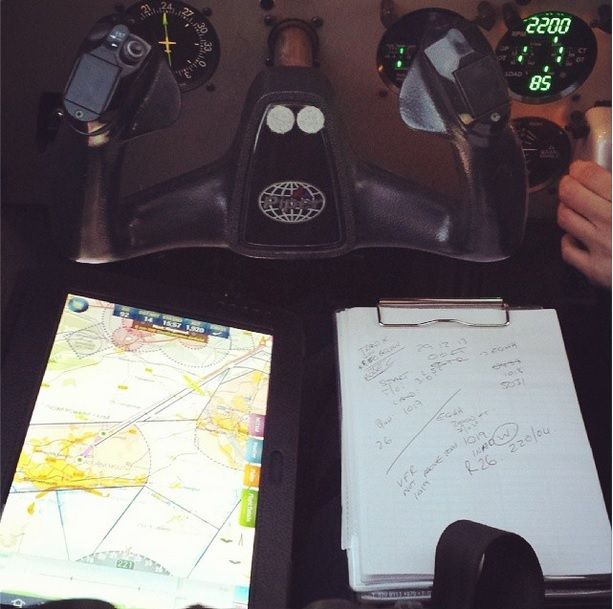
pocketfms on the tablet which is a fantastic bit of free kit. there is no flight planning and I use it for reference. It will load notams which show up on the map when you are in the vicinity, only shows airspace which is relevant to your altitude. has all the frequencies you might need and alerts you as you approach cas, giving the relevant frequency. not yet had a problem with loss of signal or overheating or hanging.
For planning/nav use a chart, original google maps with distance tool to calculate distances, look at route/airfield on satellite view which is v useful for picking out ground features / orientation and and on the day use electronic eb6 (or what ever its called) to calculate tas, drift etc etc. all very quick and easy
pocketfms on the tablet which is a fantastic bit of free kit. there is no flight planning and I use it for reference. It will load notams which show up on the map when you are in the vicinity, only shows airspace which is relevant to your altitude. has all the frequencies you might need and alerts you as you approach cas, giving the relevant frequency. not yet had a problem with loss of signal or overheating or hanging.
For planning/nav use a chart, original google maps with distance tool to calculate distances, look at route/airfield on satellite view which is v useful for picking out ground features / orientation and and on the day use electronic eb6 (or what ever its called) to calculate tas, drift etc etc. all very quick and easy


Joined: Aug 2000
Posts: 2,055
Likes: 31
From: Liverpool based Geordie, so calm down, calm down kidda!!
Ta for the replies, what do you use for flight plans? That would be useful for me. I often get tasked with very (in flight) short notice diversions up and down the country. Can waypoints be put on charts by one finger push? In other words, could I plan a route from the NW to London in a couple of minutes?
Joined: Dec 2004
Posts: 832
Likes: 0
From: East Anglia
SkyDemon is very easy and quick to use. I can plan a route in less than a minute and it will get winds aloft, NOTAMs etc immediately so that I can choose to adjust the route.
I don't file flightplans so haven't activated this feature, but all you do is set up templates for the aircraft/pilot combinations and the form is automatically filled in. I believe the charge is about £1 for each filing.
One feature I like is the ability to operate on multiple platforms. I can create my route on my PC, upload it to the cloud, then download to my Nexus 7 and also download as a backup to my iPhone.
The maps for all of Europe and NA are included in the price.
You can try it for 30 days as a free trial. I find it works faultlessly and reduces an hour of flight planning to a minute or two.
I don't file flightplans so haven't activated this feature, but all you do is set up templates for the aircraft/pilot combinations and the form is automatically filled in. I believe the charge is about £1 for each filing.
One feature I like is the ability to operate on multiple platforms. I can create my route on my PC, upload it to the cloud, then download to my Nexus 7 and also download as a backup to my iPhone.
The maps for all of Europe and NA are included in the price.
You can try it for 30 days as a free trial. I find it works faultlessly and reduces an hour of flight planning to a minute or two.
Joined: Feb 2002
Posts: 2,547
Likes: 0
From: Dublin
I use a full size iPad (in a PA28) and space isn't an issue for me, and I like the size.
It probably is more of an issue if you fly something with a stick.
I use EasyVFR by PocketFMS (I'm part of the beta team). Yes, it's possible to easily replan flights in the air. The interface for EasyVFR was specifically designed to make this as easy as possible. A no point in the re-planning process is a very accurate touch on the screen required, and there are no time sensitive parts to the planning.
So vibration or turbulence isn't really too much of an issue, and you can stop what you're doing to look outside/talk to ATC without losing your place in the re-planning.
Unlimited FREE electronic flight plan filing is included with a Frequent Flyer membership, though you'll probably struggle to get a data connection while flying, so this will probably have to be done on the ground
It probably is more of an issue if you fly something with a stick.
I use EasyVFR by PocketFMS (I'm part of the beta team). Yes, it's possible to easily replan flights in the air. The interface for EasyVFR was specifically designed to make this as easy as possible. A no point in the re-planning process is a very accurate touch on the screen required, and there are no time sensitive parts to the planning.
So vibration or turbulence isn't really too much of an issue, and you can stop what you're doing to look outside/talk to ATC without losing your place in the re-planning.
Unlimited FREE electronic flight plan filing is included with a Frequent Flyer membership, though you'll probably struggle to get a data connection while flying, so this will probably have to be done on the ground
Thread Starter
Joined: Mar 2014
Posts: 159
Likes: 0
From: Netherlands
SkyDemon has a free 30 day trial, I'm gonna use that on a borrowed tablet to see if I like it. I couldn't find a free trial for PocketFMS though. Does anybody know if it is possible to try it before buying it?
Joined: Mar 2014
Posts: 1,270
Likes: 0
From: The World
I don't recall wether this is actual or outdated, but when I used the SD demo it allowed only 30 minutes of navigation during the test period. So check this beforehand and in case, don't go for a 35 minute ride relying on it.
Joined: Feb 2001
Posts: 814
Likes: 52
From: Lechlade, Glos.UK
Using the Sky Demon demo is ok and you can start it again after 30 mins, but if my memory is correct I don't think it uses all the features. Moreover, I don't think you can use the demo for more than one month. It is just that, a demo, to see if you like it. I do!
Joined: Sep 2010
Posts: 70
Likes: 0
From: Sherborne, UK
SkyDemon employee Rob, here to offer clarifications...
The SkyDemon free trial has pretty much all the functionality active, with the exceptions being:
- The 30 minute navigation time-limit (as discussed),
- The electronic flight-plan and GAR filing features (we have an obligation to verify the identity of anyone who submits data to the AFTN)
- Third party airfield documents (Pooleys, for example)
- The download all AIP function (mass data downloads are restricted for evaluation users)
We think that the iPad mini is a great size, and tends to have the most stable environment for apps (especially the complex apps that we are talking about here). If you were focusing on Android completely then the Nexus 7 tends to get the best reports for size and stability.
I hope that helps!
The SkyDemon free trial has pretty much all the functionality active, with the exceptions being:
- The 30 minute navigation time-limit (as discussed),
- The electronic flight-plan and GAR filing features (we have an obligation to verify the identity of anyone who submits data to the AFTN)
- Third party airfield documents (Pooleys, for example)
- The download all AIP function (mass data downloads are restricted for evaluation users)
We think that the iPad mini is a great size, and tends to have the most stable environment for apps (especially the complex apps that we are talking about here). If you were focusing on Android completely then the Nexus 7 tends to get the best reports for size and stability.
I hope that helps!
Joined: Feb 2011
Posts: 54
Likes: 0
From: Leeds
I have been using SD since it's inception. I currently use a full size iPad 3 on a custom knee board. I use the scratch pad feature for noting clearances etc. The size works fine in a PA28. Although I carry paper charts, I seldom use them. I no longer carry my paper Pooleys.
