


Microsoft Windows Updates Saga

Thread Starter

Joined: Oct 2001
Posts: 659
Likes: 16
From: Lost, but often Indonesia
Microsoft Windows Updates Saga
Microsoft is attempting on a regular basis to break my Laptop by installing "updates"
My machine is a 7 year old Lenovo Yoga 310-11IAP laptop running Windows 10. It has only a 64 GB SSD. It is not upgradable. This modest machine has been brilliant. It is small, lightweight and has a touchscreen. It was also very cheap. It has not missed a beat, it does all I need from a laptop, web browsing and email etc.
Until recently that is. MS is now hijacking my machine and changing the registry so that automatic Win 10 updates are allowed to occur. My machine does not have the resources or storage to cope with this crap. Upon auto reboot, one of which took overnight, I get a load of error messages, "Win 11 cannot be loaded" etc etc, and a boat load of crapware has been loaded, including MS Outlook with Office components etc that maxes out my storage turning the machine into a useless slug.
I then have to spend hours trying to restore the laptop to it's previous configuration, deleting junk etc.
Last time around it took me hours to reinstall Mail after I deleted Outlook for example. Then I go to the registry and disable Auto Update.
But wait, MS, without my authorization has accessed and altered my registry once more and enabled another pointless, malicious "update" that will break my computer again
How is this even legal? Are they are trying to coerce me into buying a new machine? One that I wouldn't need if they didn't break in and interfere with this one?
I feel violated
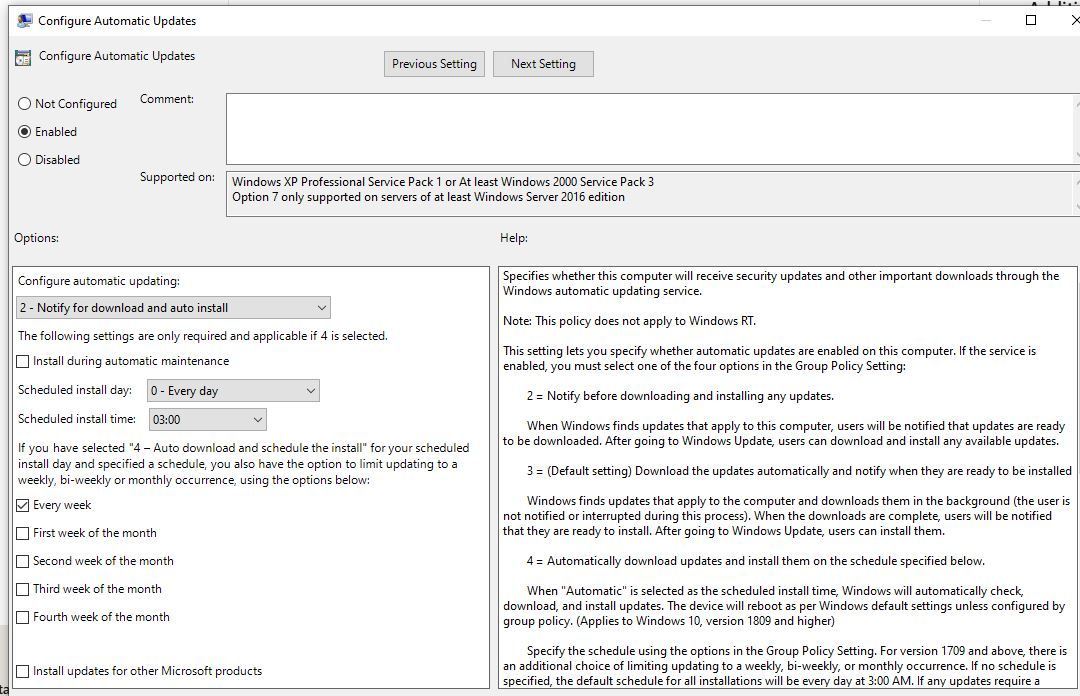
How can I put a permanent stop to these updates, or lock the registry to prevent MS access?
(The dreaded "Your device needs to restart to install updates" icon has reappeared )
)
My machine is a 7 year old Lenovo Yoga 310-11IAP laptop running Windows 10. It has only a 64 GB SSD. It is not upgradable. This modest machine has been brilliant. It is small, lightweight and has a touchscreen. It was also very cheap. It has not missed a beat, it does all I need from a laptop, web browsing and email etc.
Until recently that is. MS is now hijacking my machine and changing the registry so that automatic Win 10 updates are allowed to occur. My machine does not have the resources or storage to cope with this crap. Upon auto reboot, one of which took overnight, I get a load of error messages, "Win 11 cannot be loaded" etc etc, and a boat load of crapware has been loaded, including MS Outlook with Office components etc that maxes out my storage turning the machine into a useless slug.
I then have to spend hours trying to restore the laptop to it's previous configuration, deleting junk etc.
Last time around it took me hours to reinstall Mail after I deleted Outlook for example. Then I go to the registry and disable Auto Update.
But wait, MS, without my authorization has accessed and altered my registry once more and enabled another pointless, malicious "update" that will break my computer again
How is this even legal? Are they are trying to coerce me into buying a new machine? One that I wouldn't need if they didn't break in and interfere with this one?
I feel violated
How can I put a permanent stop to these updates, or lock the registry to prevent MS access?
(The dreaded "Your device needs to restart to install updates" icon has reappeared
)


Joined: Jan 2008
Posts: 315
Likes: 57
From: LONDON
Microsoft is attempting on a regular basis to break my Laptop by installing "updates"
My machine is a 7 year old Lenovo Yoga 310-11IAP laptop running Windows 10. It has only a 64 GB SSD. It is not upgradable. This modest machine has been brilliant. It is small, lightweight and has a touchscreen. It was also very cheap. It has not missed a beat, it does all I need from a laptop, web browsing and email etc.
Until recently that is. MS is now hijacking my machine and changing the registry so that automatic Win 10 updates are allowed to occur. My machine does not have the resources or storage to cope with this crap. Upon auto reboot, one of which took overnight, I get a load of error messages, "Win 11 cannot be loaded" etc etc, and a boat load of crapware has been loaded, including MS Outlook with Office components etc that maxes out my storage turning the machine into a useless slug.
I then have to spend hours trying to restore the laptop to it's previous configuration, deleting junk etc.
Last time around it took me hours to reinstall Mail after I deleted Outlook for example. Then I go to the registry and disable Auto Update.
But wait, MS, without my authorization has accessed and altered my registry once more and enabled another pointless, malicious "update" that will break my computer again
How is this even legal? Are they are trying to coerce me into buying a new machine? One that I wouldn't need if they didn't break in and interfere with this one?
I feel violated
How can I put a permanent stop to these updates, or lock the registry to prevent MS access?
(The dreaded "Your device needs to restart to install updates" icon has reappeared)
My machine is a 7 year old Lenovo Yoga 310-11IAP laptop running Windows 10. It has only a 64 GB SSD. It is not upgradable. This modest machine has been brilliant. It is small, lightweight and has a touchscreen. It was also very cheap. It has not missed a beat, it does all I need from a laptop, web browsing and email etc.
Until recently that is. MS is now hijacking my machine and changing the registry so that automatic Win 10 updates are allowed to occur. My machine does not have the resources or storage to cope with this crap. Upon auto reboot, one of which took overnight, I get a load of error messages, "Win 11 cannot be loaded" etc etc, and a boat load of crapware has been loaded, including MS Outlook with Office components etc that maxes out my storage turning the machine into a useless slug.
I then have to spend hours trying to restore the laptop to it's previous configuration, deleting junk etc.
Last time around it took me hours to reinstall Mail after I deleted Outlook for example. Then I go to the registry and disable Auto Update.
But wait, MS, without my authorization has accessed and altered my registry once more and enabled another pointless, malicious "update" that will break my computer again
How is this even legal? Are they are trying to coerce me into buying a new machine? One that I wouldn't need if they didn't break in and interfere with this one?
I feel violated
How can I put a permanent stop to these updates, or lock the registry to prevent MS access?
(The dreaded "Your device needs to restart to install updates" icon has reappeared
)

Thread Starter
Joined: Oct 2001
Posts: 659
Likes: 16
From: Lost, but often Indonesia
Update: MS has now installed Outlook again, minus my other email accounts. Mail no longer functions, along with my other email accounts
MS is relentlessly forcing/ making changes on my machine against my wishes.
MS is effectively raping my laptop
How do I contact Bill Gates?
MS is relentlessly forcing/ making changes on my machine against my wishes.
MS is effectively raping my laptop
How do I contact Bill Gates?


Joined: Jan 2000
Posts: 1,415
Likes: 90
pdate: MS has now installed Outlook again, minus my other email accounts. Mail no longer functions, along with my other email accounts
The Outlook email ads threat has not turned out to be as bad as expected - just a couple a day at the moment.
Joined: Jan 2008
Posts: 315
Likes: 57
From: LONDON
Sorry. I’d been reading a different thread here where some posters were complaining about the number of non professionals on this website, and here we have ‘Windows Home’ vs ‘Windows Professional’.
I guess my comment didn’t work out of context.
No offence intended.
I guess my comment didn’t work out of context.
No offence intended.
Joined: Dec 2007
Aviation Qualifications: Military
Posts: 94
Likes: 15
From: Behind You...
I believe that the Outlook install/reinstall is because Windows Calendar is being replaced by Outlook.
Every time that you open Calendar, it will now install Outlook.
Teej.
Every time that you open Calendar, it will now install Outlook.
Teej.
Joined: Oct 2007
Posts: 1,003
Likes: 16
From: Here
1. set your relevant Interfaces as Metered Connections.
2. Go into Windows Update Settings/Advanced Options
Set "Download updates over metered connections" to OFF.
Works for WiFi and Ethernet. My WiFi has been so set for months and there seem no adverse effects.
https://support.microsoft.com/en-gb/...c-ef813f3f58cf


Joined: Oct 2014
Posts: 191
Likes: 32
From: My head is in the clouds, my feet firmly on the ground.
Just ditch Microspy Windows altogether. There are several Linux variants that Windows users will not have great difficulty in changing over to. The Linux environment is also suitable for the more 'elderly' laptops / PCs and doesn't keep reporting back to base / loading spyware, etc.
Linux is also FREE.
Linux is also FREE.


