


One PC won't show my website at new host - all other PC's do show it

Thread Starter
Joined: Dec 2013
Posts: 225
Likes: 29
From: UK
One PC won't show my website at new host - all other PC's do show it
Ten days ago I changed the hosting company for my website. Everything went well except that one of the three computers at home refuses to point towards the website at the new host. It continues to try to point at the old host, showing a frozen website page until it was removed today and it now just shows a blank page.
The problem is the same with Firefox, Pale Moon and Internet Explorer browsers on that Windows 10 PC. I have tried all the recognised methods of clearing browser caches, history, flushed DNS etc etc. In desperation I uninstalled and reinstalled Firefox with no change. Friends all over the world can see my website with the new host - it's just this one computer at home that refuses to do so. I can only think there must be a registry item causing this but which one? Ideas welcome!
The problem is the same with Firefox, Pale Moon and Internet Explorer browsers on that Windows 10 PC. I have tried all the recognised methods of clearing browser caches, history, flushed DNS etc etc. In desperation I uninstalled and reinstalled Firefox with no change. Friends all over the world can see my website with the new host - it's just this one computer at home that refuses to do so. I can only think there must be a registry item causing this but which one? Ideas welcome!


Joined: Jul 2008
Posts: 447
Likes: 0
From: london
Ten days ago I changed the hosting company for my website. Everything went well except that one of the three computers at home refuses to point towards the website at the new host. It continues to try to point at the old host, showing a frozen website page until it was removed today and it now just shows a blank page.
The problem is the same with Firefox, Pale Moon and Internet Explorer browsers on that Windows 10 PC. I have tried all the recognised methods of clearing browser caches, history, flushed DNS etc etc. In desperation I uninstalled and reinstalled Firefox with no change. Friends all over the world can see my website with the new host - it's just this one computer at home that refuses to do so. I can only think there must be a registry item causing this but which one? Ideas welcome!
The problem is the same with Firefox, Pale Moon and Internet Explorer browsers on that Windows 10 PC. I have tried all the recognised methods of clearing browser caches, history, flushed DNS etc etc. In desperation I uninstalled and reinstalled Firefox with no change. Friends all over the world can see my website with the new host - it's just this one computer at home that refuses to do so. I can only think there must be a registry item causing this but which one? Ideas welcome!
Start off by looking at the ip layer
Open a command window and try these:
Are you using the same dns server on both machines? is it a home set up where the dns is in fact your home router that proxies queries to the isp? ( so try resettiing that) - use ipconfig /all to see what is in use
Does the host name resolve correctly ? use nslookup on this machine to tell what ip address the dns returns for that site name. Is it the same on all machines?
Once you have an ip address for the host name can you ping it? can you tracert to it?
What happens if you put the ip address into the browser instead of the www,yoursite.com
that will at least eliminate one line of enquiry
Joined: Jul 2008
Posts: 447
Likes: 0
From: london
Thread Starter
Joined: Dec 2013
Posts: 225
Likes: 29
From: UK
Thanks for the suggestions. All a bit beyond my knowledge but hopefully tried them correctly. Taking them in turn:
It's not a home setup - the hosting company is Krystal Hosting in London and it's on a shared Server IP.
nslookup points correctly to the new host for my website and is the same on all three PC's.
I can ping the IP address on the PC in question.
I can tracert to it on the same PC - 15 steps.
Entering the IP address into Firefox instead of the web address gives the following - same on all three PC's - two of which are working correctly with my website :
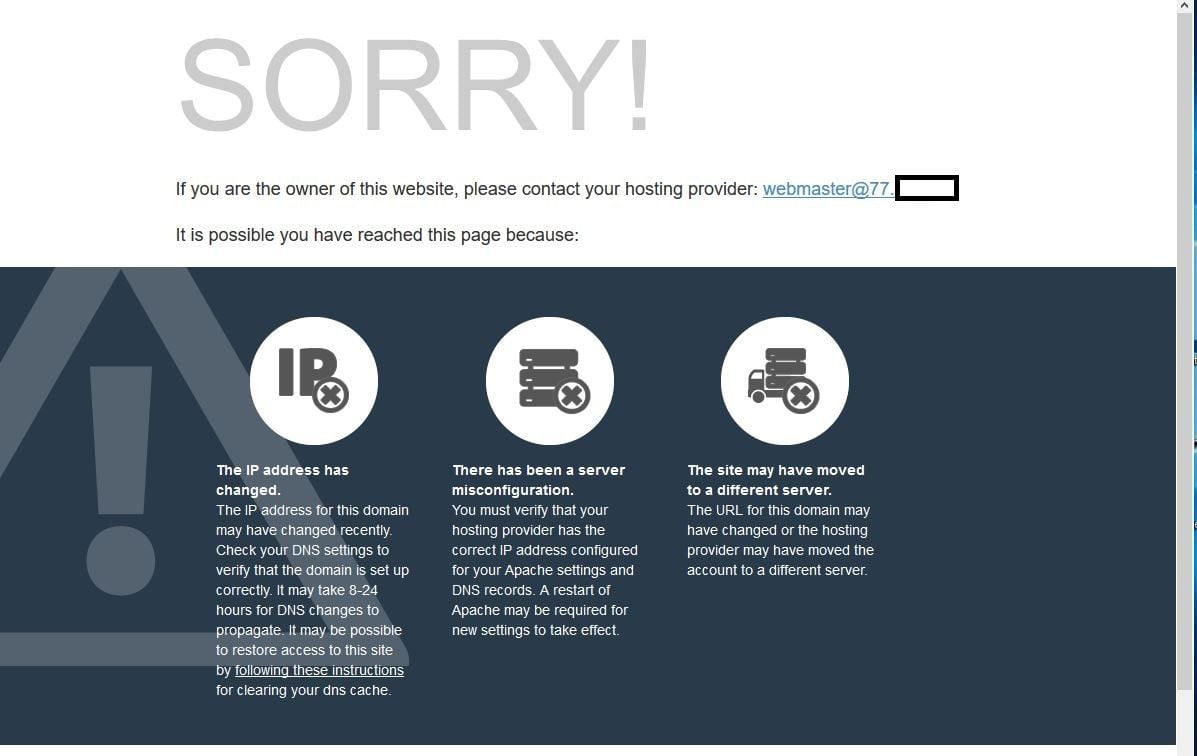
It's not a home setup - the hosting company is Krystal Hosting in London and it's on a shared Server IP.
nslookup points correctly to the new host for my website and is the same on all three PC's.
I can ping the IP address on the PC in question.
I can tracert to it on the same PC - 15 steps.
Entering the IP address into Firefox instead of the web address gives the following - same on all three PC's - two of which are working correctly with my website :

Joined: Oct 2007
Posts: 1,003
Likes: 16
From: Here
^^^ this.
c: \windows\system32\drivers\etc\hosts
Still seems to be at that location even on 64 bit systems.
Can be troublesome to edit as it is often specially protected and notepad may try to add .txt to the end of the name. I wouldn't try to edit it with a word processor.
I would open an administrator command window -
cd \windows\system32\drivers\etc
notepad hosts
when done save.
Put a hash "#" at the start of any lines you want to disable. Then you can easily undo it by removing the hash later.
Also -
It is normal for hosting services to respond with an error if you try the ip address. One address may be used for many websites and it uses the entire URL to distinguish between them.
c: \windows\system32\drivers\etc\hosts
Still seems to be at that location even on 64 bit systems.
Can be troublesome to edit as it is often specially protected and notepad may try to add .txt to the end of the name. I wouldn't try to edit it with a word processor.
I would open an administrator command window -
cd \windows\system32\drivers\etc
notepad hosts
when done save.
Put a hash "#" at the start of any lines you want to disable. Then you can easily undo it by removing the hash later.
Also -
It is normal for hosting services to respond with an error if you try the ip address. One address may be used for many websites and it uses the entire URL to distinguish between them.
Thread Starter
Joined: Dec 2013
Posts: 225
Likes: 29
From: UK
jimjim1 - many thanks for that, the problem has been solved by your suggestion. There were two lines there pointing back to my old host. Don't know how they got there, certainly not by me as I haven't got the knowledge to do that kind of thing.
Plastic PPRuNer

Joined: Sep 2000
Posts: 1,902
Likes: 0
From: Rochechouart, France

HostsMan is an excellent piece of freeware for managing your HOSTS file (Windows).
The originator at abdelhadigital.com has been offline for a long time but you can still download it from:
https://www.majorgeeks.com/files/details/hostsman.html
Simple to use, updates itself from reputable online lists of bad hosts and doesn't get in the way.
A good HOSTS file is one of the best protections against malware that you can have.
Mac
The originator at abdelhadigital.com has been offline for a long time but you can still download it from:
https://www.majorgeeks.com/files/details/hostsman.html
Simple to use, updates itself from reputable online lists of bad hosts and doesn't get in the way.
A good HOSTS file is one of the best protections against malware that you can have.
Mac
