


Windows 7 Explorer Failures - Unsolvable for the last 17 months now.


Joined: Sep 2000
Posts: 303
Likes: 0
From: England
BOAC - Created that.......
But it just turned up multiple instances of the abstraction below (which essentially tells you the the data-link library file is not playing the game). It doesn't get us anywhere.
Faulting application name: Explorer.EXE, version: 6.1.7600.16450, time stamp: 0x4aeba271
Faulting module name: EXPLORERFRAME.dll, version: 6.1.7600.16385, time stamp: 0x4a5bda55
Exception code: 0xc0000005
Fault offset: 0x0001a256
Faulting process id: 0xe90
Faulting application start time: 0x01cb72ae35bfcb74
Faulting application path: C Windows\Explorer.EXE
Faulting module path: CWindows\system32\EXPLORERFRAME.dll
Report Id: 5c7c032c-e008-11df-890f-a4badbcedda4
- EventData
Explorer.EXE
6.1.7600.16450
4aeba271
EXPLORERFRAME.dll
6.1.7600.16385
4a5bda55
c0000005
0001a256
e90
01cb72ae35bfcb74
CWindows\Explorer.EXE
CWindows\system32\EXPLORERFRAME.dll
5c7c032c-e008-11df-890f-a4badbcedda4
Faulting application name: Explorer.EXE, version: 6.1.7600.16450, time stamp: 0x4aeba271
Faulting module name: EXPLORERFRAME.dll, version: 6.1.7600.16385, time stamp: 0x4a5bda55
Exception code: 0xc0000005
Fault offset: 0x0001a256
Faulting process id: 0xe90
Faulting application start time: 0x01cb72ae35bfcb74
Faulting application path: C
Windows\Explorer.EXEFaulting module path: C
Windows\system32\EXPLORERFRAME.dllReport Id: 5c7c032c-e008-11df-890f-a4badbcedda4
- EventData
Explorer.EXE
6.1.7600.16450
4aeba271
EXPLORERFRAME.dll
6.1.7600.16385
4a5bda55
c0000005
0001a256
e90
01cb72ae35bfcb74
C
Windows\Explorer.EXE C
Windows\system32\EXPLORERFRAME.dll 5c7c032c-e008-11df-890f-a4badbcedda4
Joined: Sep 2000
Posts: 303
Likes: 0
From: England
But how to find a copy?
You may well be onto something Green Granite. There are quite a few Google references to IE9 installation corruptions of ExplorerFrame.dll
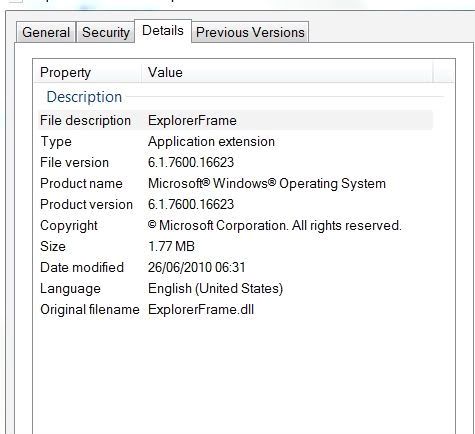
Unfortunately I cannot seem to locate a copy of the 1460kb file (ExplorerFrame.dll version 6.1.7600.16623) to test out the theory.
TS
Unfortunately I cannot seem to locate a copy of the 1460kb file (ExplorerFrame.dll version 6.1.7600.16623) to test out the theory.
TS
Official PPRuNe Chaplain
Joined: Apr 2001
Posts: 3,498
Likes: 0
From: Witnesham, Suffolk
My ExplorerFrame.dll is version 6.1.7600.16385 and I've run all Windows updates. Windows updater tells me all is up to date.
I don't get the problem, either.
It seems 16623 is part of IE9. Since I don't use IE, I've not updated to IE9.
If the OP hasn't switched to IE9, the problem may lie elsewhere.
I don't get the problem, either.
It seems 16623 is part of IE9. Since I don't use IE, I've not updated to IE9.
If the OP hasn't switched to IE9, the problem may lie elsewhere.

Joined: Jan 2008
Posts: 1,133
Likes: 0
From: Bracknell, Berks, UK
I have the same problem on two PC's One with Win 7 Home Premium and one on Win 7 Ultimate.
Hence my suspicion would lie with a common 3rd-party app/add-in/piece of storage hardware.

Joined: Jan 2008
Posts: 1,133
Likes: 0
From: Bracknell, Berks, UK

So, uninstall Rapport on one of the two PCs, and see how you get on?

Joined: Sep 2006
Posts: 638
Likes: 18
From: South Oxfordshire
I have W7 64 bit (upgraded from Vista) with Rapport installed. Curiously, I haven't had any problems relating to Internet Explorer or Rapport, although others clearly have had all sorts of issues with both.
Joined: Sep 2000
Posts: 303
Likes: 0
From: England
Thinking of trying this solution
Repair Install - Windows 7 Forums
.........but it seems tres complexe.
Alternatively, there's "REIMAGE REPAIR"
see tinyurl.com/2fguzz2
.........but it seems tres complexe.
Alternatively, there's "REIMAGE REPAIR"
see tinyurl.com/2fguzz2
Last edited by TheShadow; 28th October 2010 at 12:14.
Joined: Apr 2010
Posts: 28
Likes: 0
From: Lower Silesia
Try disabling Network Discovery.
Even if you don't run a network, some API's may suggest to the operating system that it should look for one. That can result in delay (hourglassing) or in some cases failure and restart of Win7 Explorer - as it times out, unable to find the network that it believes should be there.
Even if you don't run a network, some API's may suggest to the operating system that it should look for one. That can result in delay (hourglassing) or in some cases failure and restart of Win7 Explorer - as it times out, unable to find the network that it believes should be there.
Joined: Sep 2000
Posts: 303
Likes: 0
From: England
Well done Microsleuth WWW
Appears to have made all the difference. Thanks.
Now using the proprietary Buffalo utility to access my network and ditched the MS Network Discovery with its pregnant pauses and failures.
Keef put us on track.
Now using the proprietary Buffalo utility to access my network and ditched the MS Network Discovery with its pregnant pauses and failures.
Keef put us on track.
Thread Starter
Joined: Nov 1999
Posts: 324
Likes: 0
Hmm, just tried it. Looks promising......
Mike-Bracknell was also on-track towards a solution.
I've tried Start/MScfg and eliminated a lot of start-up memory-sucking parasitic "lodgers". That had also made a notable difference.
Killing off the MS Network Discovery bug seems to produce sustained Windows Explorer goodness and amicable behaviour. Time will tell. But it's always returned in the past to haunt progress.
I've tried Start/MScfg and eliminated a lot of start-up memory-sucking parasitic "lodgers". That had also made a notable difference.
Killing off the MS Network Discovery bug seems to produce sustained Windows Explorer goodness and amicable behaviour. Time will tell. But it's always returned in the past to haunt progress.
