


Slow performance........

Thread Starter
...the thin end thereof

Joined: Jun 1998
Posts: 269
Likes: 0
From: London
 Slow performance........
Hi -
The PC I built a few months ago (see here for previous thread) - is still causing me problems.
It is very slow booting programs and prone to crash on startup.
Now, even more irritatingly, it has started 'jerking' while playing mp3 files etc.
I reinstalled windows last week, but it has not helped - in fact the second problem has started since I reinstalled!
I have investigated a few possibilities, checked the RAM for errors, checked the CPU temperature etc and they don't appear to be the problem. The power supply should be more than sufficient for the system.
Any suggestions very gratefully received.
Thanks
The PC I built a few months ago (see here for previous thread) - is still causing me problems.
It is very slow booting programs and prone to crash on startup.
Now, even more irritatingly, it has started 'jerking' while playing mp3 files etc.
I reinstalled windows last week, but it has not helped - in fact the second problem has started since I reinstalled!
I have investigated a few possibilities, checked the RAM for errors, checked the CPU temperature etc and they don't appear to be the problem. The power supply should be more than sufficient for the system.
Any suggestions very gratefully received.
Thanks

The Oracle

Joined: Aug 2001
Posts: 2,902
Likes: 0
From: Naples, Florida U.S.A.
Wedge,
That machine should not be slow. My guess is you either have some sort of pest in there or there is a piece of hardware not properly configured/installed.
The questions would be where to start. I would run though:
Guide for Eliminating Spyware, Adware, and Random Popups
If you do not find anything, then I would get your system down to bare bones:
If that does not give us any hints at the problem we could take a look at Hijack This! to see what it shows.
Take Care,
Richard
That machine should not be slow. My guess is you either have some sort of pest in there or there is a piece of hardware not properly configured/installed.
The questions would be where to start. I would run though:
Guide for Eliminating Spyware, Adware, and Random Popups
If you do not find anything, then I would get your system down to bare bones:
- 1 HD Primary Master
- 1 Optical Drive Secondary Master
- Floppy Drive
- AGP Vid Card
- No PCI Cards
- Keyboard
- Monitor
- Mouse
If that does not give us any hints at the problem we could take a look at Hijack This! to see what it shows.
Take Care,
Richard
Thread Starter
...the thin end thereof
Joined: Jun 1998
Posts: 269
Likes: 0
From: London
Thanks Richard.
It's highly unlikely to be spyware/virus related as I did a clean install of Windows last week and it did not help.
I'm sure it's a hardware fault.
The 'jerking' seems to be related to the mouse. It seems to be OK with one particular USB mouse but not the new one I have bought?
I tried a different mouse as it seemed to be related to the PS2 mouse.
I will try stripping the system down to the bare bones to see what gives.
Thanks for you help.
It's highly unlikely to be spyware/virus related as I did a clean install of Windows last week and it did not help.
I'm sure it's a hardware fault.
The 'jerking' seems to be related to the mouse. It seems to be OK with one particular USB mouse but not the new one I have bought?
I tried a different mouse as it seemed to be related to the PS2 mouse.
I will try stripping the system down to the bare bones to see what gives.
Thanks for you help.
The Oracle
Joined: Aug 2001
Posts: 2,902
Likes: 0
From: Naples, Florida U.S.A.
Wedge,
The reason I mentioned a pest is because a fresh install of WinXP would not have all the security patches and if you went on to the internet without being behind a firewall in order to get the updates, you could have been infected. Second, if the pest was in your data, when you put you old data back on to the comp, you could have been infected there again.
Now, since this could be mouse related, I would be interested to see what your bare bones test comes back with.
Take Care,
Richard
The reason I mentioned a pest is because a fresh install of WinXP would not have all the security patches and if you went on to the internet without being behind a firewall in order to get the updates, you could have been infected. Second, if the pest was in your data, when you put you old data back on to the comp, you could have been infected there again.
Now, since this could be mouse related, I would be interested to see what your bare bones test comes back with.
Take Care,
Richard
Thread Starter
...the thin end thereof
Joined: Jun 1998
Posts: 269
Likes: 0
From: London
Thanks Richard, excellent advice (as always).
Stripped it down as you suggested and it ran fine.
Mouse and keyboard working fine.
Then I reattached the second CD drive and the USB internet wireless adaptor. Still no problems
That also rules out a pest.
It MUST be the soundcard. I will reattach it and install the latest drivers, and see if it works.
If not, I will buy a new one, any suggestions?
Stripped it down as you suggested and it ran fine.
Mouse and keyboard working fine.
Then I reattached the second CD drive and the USB internet wireless adaptor. Still no problems
That also rules out a pest.
It MUST be the soundcard. I will reattach it and install the latest drivers, and see if it works.
If not, I will buy a new one, any suggestions?
Thread Starter
...the thin end thereof
Joined: Jun 1998
Posts: 269
Likes: 0
From: London
Scratch that, I have decided NOT to put the soundcard back in and use the onboard motherboard sound.
But, and what a surprise, I can't get it to work.
I re-enabled the onboard device in BIOS and Windows found it on startup, I then installed the drivers from the NVIDIA motherboard drivers CD that I downloaded before.
I did forget to uninstall the SoundBlaster rubbish first though.
I'm now looking on the Gigabyte website for the most up to date drivers, but it you have any better suggestions please reply!
But, and what a surprise, I can't get it to work.
I re-enabled the onboard device in BIOS and Windows found it on startup, I then installed the drivers from the NVIDIA motherboard drivers CD that I downloaded before.
I did forget to uninstall the SoundBlaster rubbish first though.
I'm now looking on the Gigabyte website for the most up to date drivers, but it you have any better suggestions please reply!
The Oracle
Joined: Aug 2001
Posts: 2,902
Likes: 0
From: Naples, Florida U.S.A.

Thread Starter
...the thin end thereof
Joined: Jun 1998
Posts: 269
Likes: 0
From: London
I've sent the motherboard and CPU back for testing, no faults were found.
Since I have put it back together it is switching itself off.
The CPU temp was well over 90C even though I am using the correctly approved heatsink for the AMD XP3000 CPU.
Could the CPU have been damaged running at that temperature?
Do I need a new heatsink?
Thanks
Since I have put it back together it is switching itself off.
The CPU temp was well over 90C even though I am using the correctly approved heatsink for the AMD XP3000 CPU.
Could the CPU have been damaged running at that temperature?
Do I need a new heatsink?
Thanks
The Oracle
Joined: Aug 2001
Posts: 2,902
Likes: 0
From: Naples, Florida U.S.A.
Wedge,
You could have cooked the CPU.
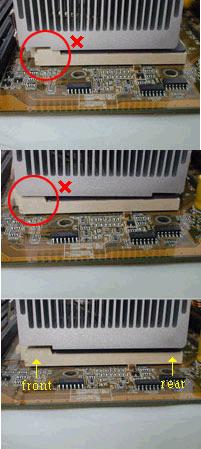
Tell me what Thermal Grease you used when you attached the Heatsink this time? Also make sure the Heatsink is on correctly:
Take Care,
Richard
You could have cooked the CPU.
Tell me what Thermal Grease you used when you attached the Heatsink this time? Also make sure the Heatsink is on correctly:
Take Care,
Richard
Thread Starter
...the thin end thereof
Joined: Jun 1998
Posts: 269
Likes: 0
From: London
I think the CPU is OK Richard, I know +90C is dangerously high but it's still working.
I suspect the problem has been overheating all along. I've ordered a new cooler which is good for AMD athlon up to XP3400Mhz.
Before, there was no thermal grease on the CPU, just the pad on the bottom that came with the cooler.
Yesterday I added Antec thermal grease and it cooled it down significantly but the CPU still runs up to well over 70C.
It was booting at 78C before I added the grease, which is far too high which suggests a cooling problem.
How do I know if I've cooked the CPU? Would it work at all?
Cheers
I suspect the problem has been overheating all along. I've ordered a new cooler which is good for AMD athlon up to XP3400Mhz.
Before, there was no thermal grease on the CPU, just the pad on the bottom that came with the cooler.
Yesterday I added Antec thermal grease and it cooled it down significantly but the CPU still runs up to well over 70C.
It was booting at 78C before I added the grease, which is far too high which suggests a cooling problem.
How do I know if I've cooked the CPU? Would it work at all?
Cheers
The Oracle
Joined: Aug 2001
Posts: 2,902
Likes: 0
From: Naples, Florida U.S.A.
Wedge,
The bad news is you could have damaged your CPU, the good news in AthlonXPs are very cheap now, so if you need to replace it, you will be able to without much damage to your wallet.
Take Care,
Richard
The bad news is you could have damaged your CPU, the good news in AthlonXPs are very cheap now, so if you need to replace it, you will be able to without much damage to your wallet.
Take Care,
Richard
Thread Starter
...the thin end thereof
Joined: Jun 1998
Posts: 269
Likes: 0
From: London
Fortunately the CPU seems fine.
I got a new cooler for it. That sorted most things out - the 'jerking' was due in part at least to a hot CPU.
However - the problems are still not completely sorted.
I am still getting the Hard Drive stuck sometimes on bootup, and slow performance starting programs. Once they've been loaded once the system runs fine.
I'm suspecting a defective Hard Drive because I'm often getting "One of your disks needs to be checked for consistency" and auto disk checks on startup.
I'm thinking of buying a new hard drive and installing windows on that, and using the second as a slave to transfer the data over and see if that helps.
Is it worth buying a new HD???
Thanks a lot.
I got a new cooler for it. That sorted most things out - the 'jerking' was due in part at least to a hot CPU.
However - the problems are still not completely sorted.
I am still getting the Hard Drive stuck sometimes on bootup, and slow performance starting programs. Once they've been loaded once the system runs fine.
I'm suspecting a defective Hard Drive because I'm often getting "One of your disks needs to be checked for consistency" and auto disk checks on startup.
I'm thinking of buying a new hard drive and installing windows on that, and using the second as a slave to transfer the data over and see if that helps.
Is it worth buying a new HD???
Thanks a lot.
'nough said
Joined: Sep 2002
Posts: 1,025
Likes: 0
From: Raynes Park
Have you tried scanning the disk for bad sectors?
(in my computer, right click on C drive, select properties, Tools, error checking and tick check for bad sectors <-- might have to adapt that for XP/these are for Win 2000)
That would give you pretty good idea as to the physical state of the HD.
And if you're going to buy one I'd go down the SATA route - your motherboard doesn't seem to support it but you can a PCI adapter card for £20 Dabs.com and an 80GB SATA for £44 (again dabs.com ) - this will give some extra speed - wish I'd done it when my HD broken a few weeks ago...
My 2p anyway..
(in my computer, right click on C drive, select properties, Tools, error checking and tick check for bad sectors <-- might have to adapt that for XP/these are for Win 2000)
That would give you pretty good idea as to the physical state of the HD.
And if you're going to buy one I'd go down the SATA route - your motherboard doesn't seem to support it but you can a PCI adapter card for £20 Dabs.com and an 80GB SATA for £44 (again dabs.com ) - this will give some extra speed - wish I'd done it when my HD broken a few weeks ago...
My 2p anyway..
The Oracle
Joined: Aug 2001
Posts: 2,902
Likes: 0
From: Naples, Florida U.S.A.
Charles,
Unless you are going to go with WD Raptors or Seagate's 7200.7, I do not see any advantage of going SATA. The current Hard Drives cannot use up the Bandwidth provided by the IDE Controller.
Take Care,
Richard
Unless you are going to go with WD Raptors or Seagate's 7200.7, I do not see any advantage of going SATA. The current Hard Drives cannot use up the Bandwidth provided by the IDE Controller.
Take Care,
Richard
'nough said
Joined: Sep 2002
Posts: 1,025
Likes: 0
From: Raynes Park
Thanks Richard though I'm sure I saw a performance gain when I tested a client's SATA drive the other day - for example the way thumbnails were being displayed in ACDSee - my current set up was doing them quickly, but the pictures on the SATA drive via my PCI adapter were displaying in a blink of an eye. Not very scientific I know but it convinced me the way to go next time (also I'd like to have RAID 0 or 1 next time I change disks).
I was also suggesting it for future proofing - if he was to upgrade in the future IDE's might have gone the same way as VCRs.
SATA's are also easier to connect, have smaller less twisted cables therefore improve airflow.
And SATA are not much different in price from IDE, even in the UK, so why not?
My 4€'s worth anyway...
C.
I was also suggesting it for future proofing - if he was to upgrade in the future IDE's might have gone the same way as VCRs.
SATA's are also easier to connect, have smaller less twisted cables therefore improve airflow.
And SATA are not much different in price from IDE, even in the UK, so why not?
My 4€'s worth anyway...
C.
Thread Starter
...the thin end thereof
Joined: Jun 1998
Posts: 269
Likes: 0
From: London
Thanks for the suggestions, but it is worth me getting a new HD at all?
I have scanned for bad sectors.
It's an intermittent problem. Sometimes the PC boots up and just locks up with the HD drive light on, doesn't respond to Ctrl-Alt-Del etc.
It's usually fine once it gets going.
I have scanned for bad sectors.
It's an intermittent problem. Sometimes the PC boots up and just locks up with the HD drive light on, doesn't respond to Ctrl-Alt-Del etc.
It's usually fine once it gets going.


