


Gmail recovery

Thread Starter


Joined: Feb 2000
Posts: 1,993
Likes: 512
From: UK
Gmail recovery
This references athread which I have running in JB.
In essence, I am unable to login to my gmail account, even though the 'system' recognises me as being valid. The verification process is completed via my Nexus tablet and once completed I end up with the following screen , on my desktop (W8 64bit Pro)
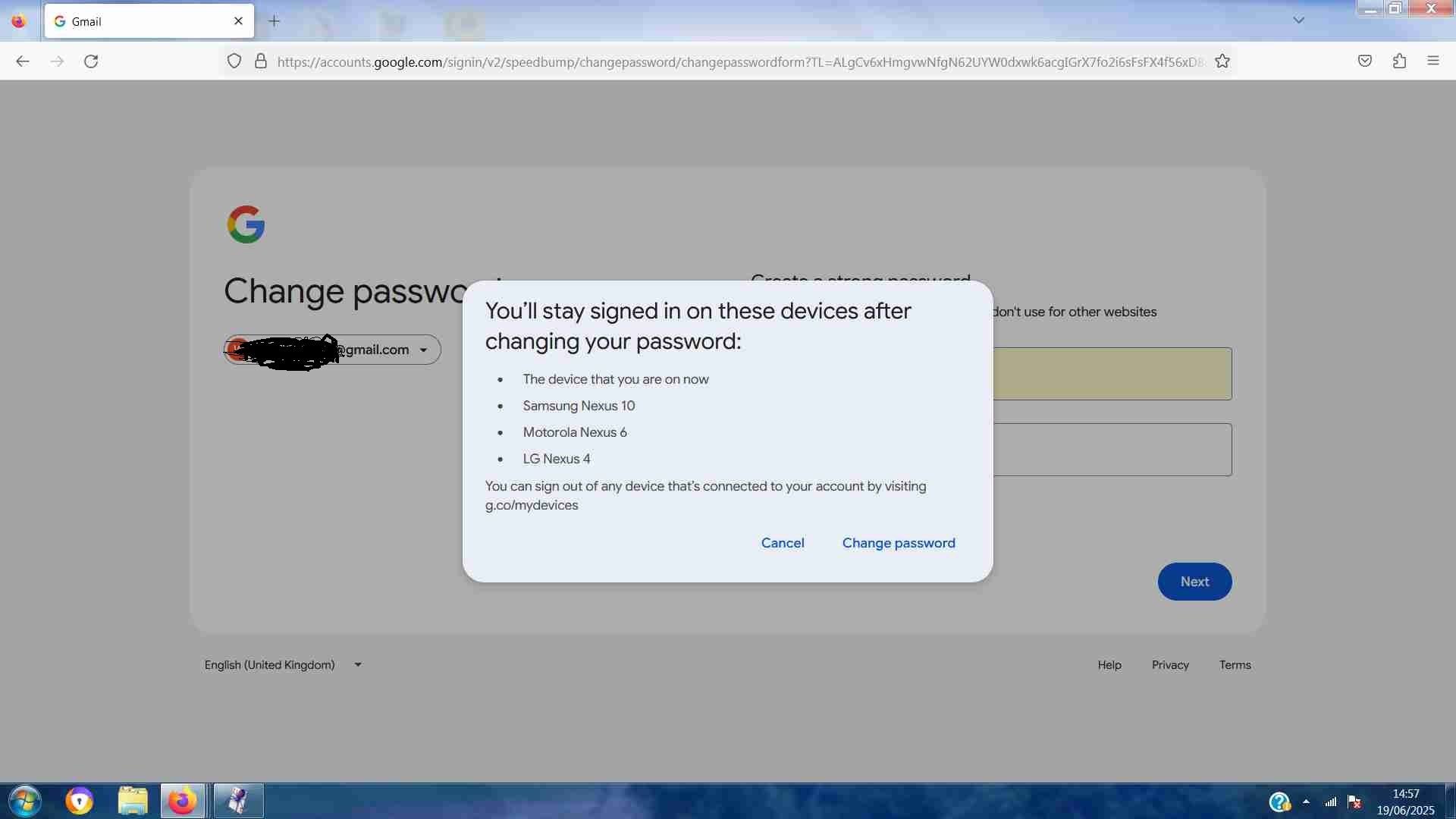
... after going through the password change process (done this several, separate times, with different P/Ws), when I attempt ro log-in using the newly minted P/W, I get this

I used to be a fan of roundabouts, but this is not fun !
Does anyone have a suggestion as to how to proceed, please ?
In essence, I am unable to login to my gmail account, even though the 'system' recognises me as being valid. The verification process is completed via my Nexus tablet and once completed I end up with the following screen , on my desktop (W8 64bit Pro)
... after going through the password change process (done this several, separate times, with different P/Ws), when I attempt ro log-in using the newly minted P/W, I get this
I used to be a fan of roundabouts, but this is not fun !
Does anyone have a suggestion as to how to proceed, please ?


Guest
Joined: May 2024
Posts: 78
Likes: 224
From: Glasgow
A Nexus tablet (likely running Android 5.x or older) and the browser on Windows 8 64-bit Pro desktop may simply be too outdated to reliably handle modern Gmail authentication, specifically password sync
Last edited by PPRuNeUser548247; 24th June 2025 at 16:44.


Joined: Jan 2008
Posts: 315
Likes: 57
From: LONDON
This references athread which I have running in JB.
In essence, I am unable to login to my gmail account, even though the 'system' recognises me as being valid. The verification process is completed via my Nexus tablet and once completed I end up with the following screen , on my desktop (W8 64bit Pro)
... after going through the password change process (done this several, separate times, with different P/Ws), when I attempt ro log-in using the newly minted P/W, I get this
I used to be a fan of roundabouts, but this is not fun !
Does anyone have a suggestion as to how to proceed, please ?
In essence, I am unable to login to my gmail account, even though the 'system' recognises me as being valid. The verification process is completed via my Nexus tablet and once completed I end up with the following screen , on my desktop (W8 64bit Pro)
... after going through the password change process (done this several, separate times, with different P/Ws), when I attempt ro log-in using the newly minted P/W, I get this
I used to be a fan of roundabouts, but this is not fun !
Does anyone have a suggestion as to how to proceed, please ?
Thread Starter
Joined: Feb 2000
Posts: 1,993
Likes: 512
From: UK

Don't really understand the 'inner workings' of any of the functions much beyond " Click on required function"

e.g. To access email (always via desktop machine) ...
Click on Firefox
either, click on gmail.com (if available) or type gmail.com on the address line and read the stored emails which appear or select whichever function is needed.
I understand that this process is selecting and operating a programme = the term "app" doesn't mean anything to me
Joined: Jan 2008
Posts: 315
Likes: 57
From: LONDON
This references athread which I have running in JB.
In essence, I am unable to login to my gmail account, even though the 'system' recognises me as being valid. The verification process is completed via my Nexus tablet and once completed I end up with the following screen , on my desktop (W8 64bit Pro)
... after going through the password change process (done this several, separate times, with different P/Ws), when I attempt ro log-in using the newly minted P/W, I get this
I used to be a fan of roundabouts, but this is not fun !
Does anyone have a suggestion as to how to proceed, please ?
In essence, I am unable to login to my gmail account, even though the 'system' recognises me as being valid. The verification process is completed via my Nexus tablet and once completed I end up with the following screen , on my desktop (W8 64bit Pro)
... after going through the password change process (done this several, separate times, with different P/Ws), when I attempt ro log-in using the newly minted P/W, I get this
I used to be a fan of roundabouts, but this is not fun !
Does anyone have a suggestion as to how to proceed, please ?
Thread Starter
Joined: Feb 2000
Posts: 1,993
Likes: 512
From: UK
netstruggler - just done another P/W reset. a pop-up offered to store the new code, which I agreed to. and the screen showed this...

following that, attempting to login using the new P/W for "no username" produces the "incorrect password" response
following that, attempting to login using the new P/W for "no username" produces the "incorrect password" response
Thread Starter
Joined: Feb 2000
Posts: 1,993
Likes: 512
From: UK


Joined: Mar 2002
Aviation Qualifications: CPL
Posts: 3,392
Likes: 325
From: near an aeroplane
Have you tried typing in the password you created instead of letting the Password Manager in Firefox handle it?
The password manager in Firefox is very nice, but also a bit dim. It stores all the passwords it encounters but does not order them very well, especially if there is no username associated with them. I would suggest having a good clearout of all the passwords you have stored in there for Gmail. I suspect that there are several in there that have no username, and you may be inadvertently selecting the wrong one.
Actually, on second thought: it is storing the password for 'accounts.google.com' but you are trying to use it on 'gmail.com' I guess, so because of that it may not be able to select the correct one from the list of stored passwords.
To clear out the old ones:
If you go to the menu hidden beneath the three horizontal stripes at the extreme right of your address bar, you will find an entry 'Passwords'. Click on that.
A new tab opens with a list of logins/websites on the left. At the top of that list is a searchbox. Type 'gmail.com' into that box.
You will then see a list of stored logins. The catch is that it also shows logins that use your gmail address as a username!
Scroll through that list and see if you can identify the ones associated with Gmail.com (note that they may be stored for 'accounts.google.com' as a result of the password change procedure). If you click on one in the list on the left, you will see when it was created, possibly updated, and when it was last used.
I would suggest removing every one that is associated with Gmail.com (the website) apart from the one you created during that last password change attempt. If you're unsure, you could remove them all and then either change the password again, or just log into Gmail.com (if the attempt with typing it in by hand worked) and have it store the password again so that it is the only one in there.
But before all that, first have a go at typing it in by hand. I hope that you also wrote it down or memorized it.... right?

Last edited by Jhieminga; 24th June 2025 at 20:49. Reason: Added info

Joined: Feb 2008
Posts: 40
Likes: 1
From: Michigan
Clear your browser cache and cookies, then try logging in again using Incognito mode or another browser. Make sure your Nexus tablet can access the full Gmail account, not just the verification prompt. Check your recovery info is up to date.
Joined: Jan 2008
Posts: 17,718
Likes: 2,083
From: Reading, UK
Apologies for that ... I'm afraid that I didn't understand what you were suggesting ! !
Don't really understand the 'inner workings' of any of the functions much beyond " Click on required function"
e.g. To access email (always via desktop machine) ...
Click on Firefox
either, click on gmail.com (if available) or type gmail.com on the address line and read the stored emails which appear or select whichever function is needed.
I understand that this process is selecting and operating a programme = the term "app" doesn't mean anything to me
Don't really understand the 'inner workings' of any of the functions much beyond " Click on required function"
e.g. To access email (always via desktop machine) ...
Click on Firefox
either, click on gmail.com (if available) or type gmail.com on the address line and read the stored emails which appear or select whichever function is needed.
I understand that this process is selecting and operating a programme = the term "app" doesn't mean anything to me
These are what I meant:
https://play.google.com/store/apps/d...gle.android.gm
https://apps.apple.com/us/app/gmail-...le/id422689480
Apps and browser interfaces often behave differently, hence my suggestion. Might be worth a try.
Thread Starter
Joined: Feb 2000
Posts: 1,993
Likes: 512
From: UK
Many thanks, DRUK, for that most useful clarification ! 
HOWEVER ............, praise be ! I have gmail back ! ! !
Jhieminga's patience and hand-holding was successful ! The 'clincher' seems to have been the P/W change sequence, which, initially, kept advising "incorrect password" when the first character of the P/W was entered I then started the 'change P/W sequence' and followed prompts and, suddenly ... there was my account page ! ! !
In all honesty, I can't recall all the individual intermediate steps - 'brain fade' tends to rule nowadays, but, that it is possible to recover once, is immensely reassuring !
Thank you to everyone who has contributed, especially Jhieminga, and apologies for being slow on the uptake. The 'roundabout' can continue untenanted !
I am tempted to leave the 'pooter' permanently switched on, and programs running
HOWEVER ............, praise be ! I have gmail back ! ! !
Jhieminga's patience and hand-holding was successful ! The 'clincher' seems to have been the P/W change sequence, which, initially, kept advising "incorrect password" when the first character of the P/W was entered
I then started the 'change P/W sequence' and followed prompts and, suddenly ... there was my account page ! ! ! In all honesty, I can't recall all the individual intermediate steps - 'brain fade' tends to rule nowadays, but, that it is possible to recover once, is immensely reassuring !
Thank you to everyone who has contributed, especially Jhieminga, and apologies for being slow on the uptake. The 'roundabout' can continue untenanted !
I am tempted to leave the 'pooter' permanently switched on, and programs running
Joined: May 2008
Posts: 142
Likes: 90
From: Depends
I'm glad it worked out, however the string of letters that comprise the website string (the bit after the https://), including some unique combination may be of more interest to hackers than the simple scribbles you did over your email address and password on some of the screenshots.
I strongly recommend you get yourself a robust password manager (BitWarden is free) and change that password yet again, this time not in public.
Three Nexus devices? All logged on?
I strongly recommend you get yourself a robust password manager (BitWarden is free) and change that password yet again, this time not in public.
Three Nexus devices? All logged on?
Thread Starter
Joined: Feb 2000
Posts: 1,993
Likes: 512
From: UK
I'm glad it worked out, however the string of letters that comprise the website string (the bit after the https://), including some unique combination may be of more interest to hackers than the simple scribbles you did over your email address and password on some of the screenshots.
I strongly recommend you get yourself a robust password manager (BitWarden is free) and change that password yet again, this time not in public.
Three Nexus devices? All logged on?
I strongly recommend you get yourself a robust password manager (BitWarden is free) and change that password yet again, this time not in public.
Three Nexus devices? All logged on?
Re the Nexuses (Nexii ?), the tablet has only been switched on, momentarily, to provide the verification contact. - the other two languish, unused, somewhere.They were purchased, secondhand, to let me join in the 'mobile phone world' ... until I realised that I had absolutely no need for such a thing !

Guest
Joined: May 2024
Posts: 78
Likes: 224
From: Glasgow
- the other two languish, unused, somewhere. -
Goto https://myaccount.google.com/device-activity, Click on each device you want to remove and select "Sign out" or "Remove access"
Goto https://myaccount.google.com/device-activity, Click on each device you want to remove and select "Sign out" or "Remove access"
Joined: May 2008
Posts: 142
Likes: 90
From: Depends
Thank you, Thirsty - I shall do as you suggest ... didn't realise that was vulnerable
Re the Nexuses (Nexii ?), the tablet has only been switched on, momentarily, to provide the verification contact. - the other two languish, unused, somewhere.They were purchased, secondhand, to let me join in the 'mobile phone world' ... until I realised that I had absolutely no need for such a thing !
Re the Nexuses (Nexii ?), the tablet has only been switched on, momentarily, to provide the verification contact. - the other two languish, unused, somewhere.They were purchased, secondhand, to let me join in the 'mobile phone world' ... until I realised that I had absolutely no need for such a thing !
THEN change your password, yet once again, just to be sure.
To make sure the password change has stuck, attempt to login using your old password to make sure it is actually rejected (once only per device so you don't trigger the 'too many attempts' protection), and then use the correct one, only on the device you wish to be trusted. When you stop using that device, make sure it is logged out.
Think of it as if you had three keys to the front door of the house. You misplaced two [ languishing somewhere ] and still have one. The other two keys still work, as long as somebody can insert them in the lock. Wouldn't you want to change your lock or get it re-keyed for peace of mind?
Joined: Jan 2008
Posts: 315
Likes: 57
From: LONDON
Congratulations.
I've not convinced by password managers. I'd have thought you'd be just as likely to lose access to that as to the gmail account. If you have lots of accounts to stay on top of then perhaps....
Make sure you keep access to that Nexus device which you've obviously configured as a verification device. That's what saved you here I think. If you can set a recovery phone number as well that would be even better. I think it can be a landline?
I've not convinced by password managers. I'd have thought you'd be just as likely to lose access to that as to the gmail account. If you have lots of accounts to stay on top of then perhaps....
Make sure you keep access to that Nexus device which you've obviously configured as a verification device. That's what saved you here I think. If you can set a recovery phone number as well that would be even better. I think it can be a landline?
Joined: May 2008
Posts: 142
Likes: 90
From: Depends
Does your landline support receiving (and more importantly displaying) those vital recovery text messages for verification codes that Google may send your way? Most countries don't.
The two factor account authentication ideally works on something you know (your secret password) and something you have on hand (your Internet connected device), and that any other person doesn't have access to both at the same time. In the case of your unused somewhere Nexii, they already have the know part stored on them as verified and trusted, and the have bit is whoever switches them on. This is why you change your passwords often, make the passwords difficult to guess, and log out the devices when they are not being used.
The amount of grief you could encounter by having your email access stolen should guide how much effort you spend on getting a password manager, and using it. Once it is set up, it usually looks after itself. You may not think that your email might be important enough to keep highly secure, but it could be hijacked by nefarious types to spread malware, spam, or even kiddie porn, and guess where the boys in blue come to visit first? They usually confiscate first and ask questions later.
For fun and frolics, try the following:
Open Firefox. Click on the hamburger menu (the three horizontal lines) select Settings, then Privacy and Security. Click on Saved Passwords. Recognize anything? Yes, everybody else that has access to your browser also has access to this information. This has saved many a frantic scramble in the brain cells for what the heck did I use for my password activity. The password manager basically does this too, except the passwords are encrypted from prying eyes and not displayed. This is also why you set up a screen lock for your unattended device and put a robust password on that too.
Be aware, be very aware...
The two factor account authentication ideally works on something you know (your secret password) and something you have on hand (your Internet connected device), and that any other person doesn't have access to both at the same time. In the case of your unused somewhere Nexii, they already have the know part stored on them as verified and trusted, and the have bit is whoever switches them on. This is why you change your passwords often, make the passwords difficult to guess, and log out the devices when they are not being used.
The amount of grief you could encounter by having your email access stolen should guide how much effort you spend on getting a password manager, and using it. Once it is set up, it usually looks after itself. You may not think that your email might be important enough to keep highly secure, but it could be hijacked by nefarious types to spread malware, spam, or even kiddie porn, and guess where the boys in blue come to visit first? They usually confiscate first and ask questions later.
For fun and frolics, try the following:
Open Firefox. Click on the hamburger menu (the three horizontal lines) select Settings, then Privacy and Security. Click on Saved Passwords. Recognize anything? Yes, everybody else that has access to your browser also has access to this information. This has saved many a frantic scramble in the brain cells for what the heck did I use for my password activity. The password manager basically does this too, except the passwords are encrypted from prying eyes and not displayed. This is also why you set up a screen lock for your unattended device and put a robust password on that too.
Be aware, be very aware...