


Incorrect £ symbol display

Thread Starter

Joined: Jan 1999
Posts: 1,377
Likes: 174
From: England
Incorrect £ symbol display
Until now I've had no problem with iOS HTML files displaying symbols correctly but texts I've compiled recently show the black diamond/white question mark icon instead of the £ symbol on Safari or Firefox. No prob on Windows/Android systems. Internet suggestions (for example typing the HTML code for £ in the source) don't work, nor does changing the chartset from ISO-8859-1 to UTF-8 or ASCII. Is this due to the latest iOS update 18.1.1 being installed?
Any ideas? Thanks for info.
Any ideas? Thanks for info.


Joined: Mar 2002
Aviation Qualifications: CPL
Posts: 3,392
Likes: 325
From: near an aeroplane
I'm using £ as the HTML code on my site, and that displays just fine on my iOS 18.1.1 iPhone. Could you perhaps provide a link to a page that does not work for you, so we can test if it works on a different device?


Thread Starter
Joined: Jan 1999
Posts: 1,377
Likes: 174
From: England
<small><sup>1</sup>⁄<sub>2</sub></small>
to generate them. I'm using FileZilla for FTP and a version of Kompozer that's a few years old. Could this be part of the problem? When I type £ in source and then save, it converts to £ but still shows incorrectly in the display. The mystery is that this is a new prob (within the last week or two). Everything was fine beforehand.
TEST
Here's a screen shot of the source:
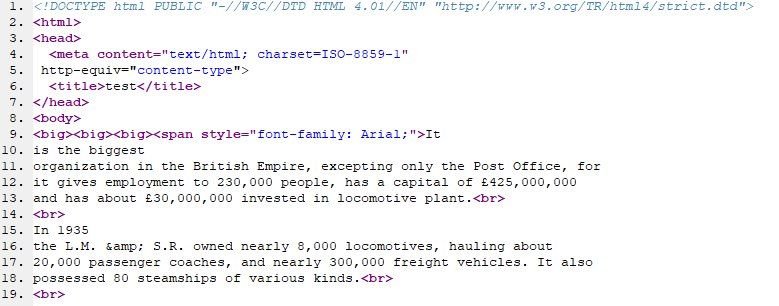
Last edited by Discorde; 30th November 2024 at 18:35.
Administrator
Joined: Mar 2001
Aviation Qualifications: PPL
Posts: 8,121
Likes: 686
From: Twickenham, home of rugby
Looking at the source, and seeing "question marks with diamonds" suggests that your page is being interpreted as UTF-8/Unicode. That could mean that your HTTP headers are declaring the wrong encoding, superseding your <meta> declaration. That could also account for the problems with fractions.
It's possible that a new version of ios is more strict about interpreting HTML headers.
It's possible that a new version of ios is more strict about interpreting HTML headers.
Joined: Oct 2019
Aviation Qualifications: Non-Aircrew
Posts: 1,701
Likes: 1,084
From: USA
I stripped the DOCTYPE line and replaced the "?" in the source code with "£" and it opens and displays correctly from a test ".html" file.
Further discussion about this topic: https://stackoverflow.com/questions/...wing-a-warning
I love the HTML standard. So many to choose from.
Further discussion about this topic: https://stackoverflow.com/questions/...wing-a-warning
I love the HTML standard. So many to choose from.
Thread Starter
Joined: Jan 1999
Posts: 1,377
Likes: 174
From: England
More troubleshooting: I've now noticed that several of the HTML files on my website, including those uploaded several years ago, are now affected by this incorrect display problem, having been OK previously. When I open these files on my PC HDD, rather than from the website, the displays are OK. So it looks like the problem is with the website host, which is names.co.uk. I'll give them a call next week. Thanks for your inputs chaps.
Joined: Mar 2002
Aviation Qualifications: CPL
Posts: 3,392
Likes: 325
From: near an aeroplane
Opening that test link you supplied, on Firefox running on a MacBook, it shows the same problem:

Same thing happens when I open the source for that page:

So it's not iOS 18.1.1. that is the problem, it is something on the server. Hope this helps.
Edit: I took the source code from the test file, replaced the diamonds with pound signs (not the HTML code for one) and have saved that as a HTML file using Dreamweaver. The result is here:
TEST
You can have a go and see how this displays on your devices.
Same thing happens when I open the source for that page:
So it's not iOS 18.1.1. that is the problem, it is something on the server. Hope this helps.
Edit: I took the source code from the test file, replaced the diamonds with pound signs (not the HTML code for one) and have saved that as a HTML file using Dreamweaver. The result is here:
TEST
You can have a go and see how this displays on your devices.
Last edited by Jhieminga; 1st December 2024 at 15:00. Reason: Added a link to the test file on my server.
Thread Starter
Joined: Jan 1999
Posts: 1,377
Likes: 174
From: England
The mystery solved! A self-inflicted wound - during a tidy up of my website I deleted a file named .htaccess which was initially installed during the change from http to https. The host reinstated the file and everything is now working properly. Hooray! The host also recommended using charset UTF-8.


