


Windows 10 desktop

Thread Starter
Joined: Apr 2008
Posts: 565
Likes: 21
From: Passed away on Sept 6th
Windows 10 desktop
One thing I've always found useful in recent iterations of Micro$haft Windows is the little date bottom right of the screen. Now on this computer, it doesn't show up on Windows 10. (The two lappies, hers and mine still show it.
I've been through all the personalisation settings I can find; still no joy.
Any clever person help, please?
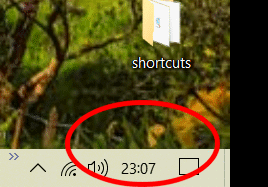
I've been through all the personalisation settings I can find; still no joy.
Any clever person help, please?

Joined: Jun 2011
Posts: 172
Likes: 0
From: New Zealand
Go to the bottom of the screen next to where the clock should be. Right Click and when the list comes up
left click on "Taskbar Settings". Scroll down to "Turn system icons on or off" Click on the clock and make
sure it says that it's "ON".
left click on "Taskbar Settings". Scroll down to "Turn system icons on or off" Click on the clock and make
sure it says that it's "ON".
Thread Starter
Joined: Apr 2008
Posts: 565
Likes: 21
From: Passed away on Sept 6th
Would have been a useful tip if it worked, thanks, Bush, unfortunately it didn't in this case. Hey-ho. Prob will come back during the next W10 update or three.
Thanks anyway.
Jim
Thanks anyway.
Jim
Joined: Jul 2015
Aviation Qualifications: CPL
Posts: 140
Likes: 29
From: Miles away
To get the date,try this: Control Panel > Date and Time > Change date and time > Change Calender settings > Additonal settings > Date > Date format. Set short date to 'ddd dd/MM/yy'

Joined: Aug 2015
Aviation Qualifications: ATPL
Posts: 51
Likes: 2
From: The Pits
Small taskbar buttons settings? Basically, enabling this setting decreases the taskbar size and hides the date. Therefore, you need to turn it off to make the date visible.
Right-click on the taskbar and select Taskbar settings. Here, turn off ‘Use small taskbar buttons.’
Right-click on the taskbar and select Taskbar settings. Here, turn off ‘Use small taskbar buttons.’


