


A new Mac Scam?

Thread Starter
Joined: Jun 2002
Posts: 3
Likes: 5
From: Wor Yerm
A new Mac Scam?
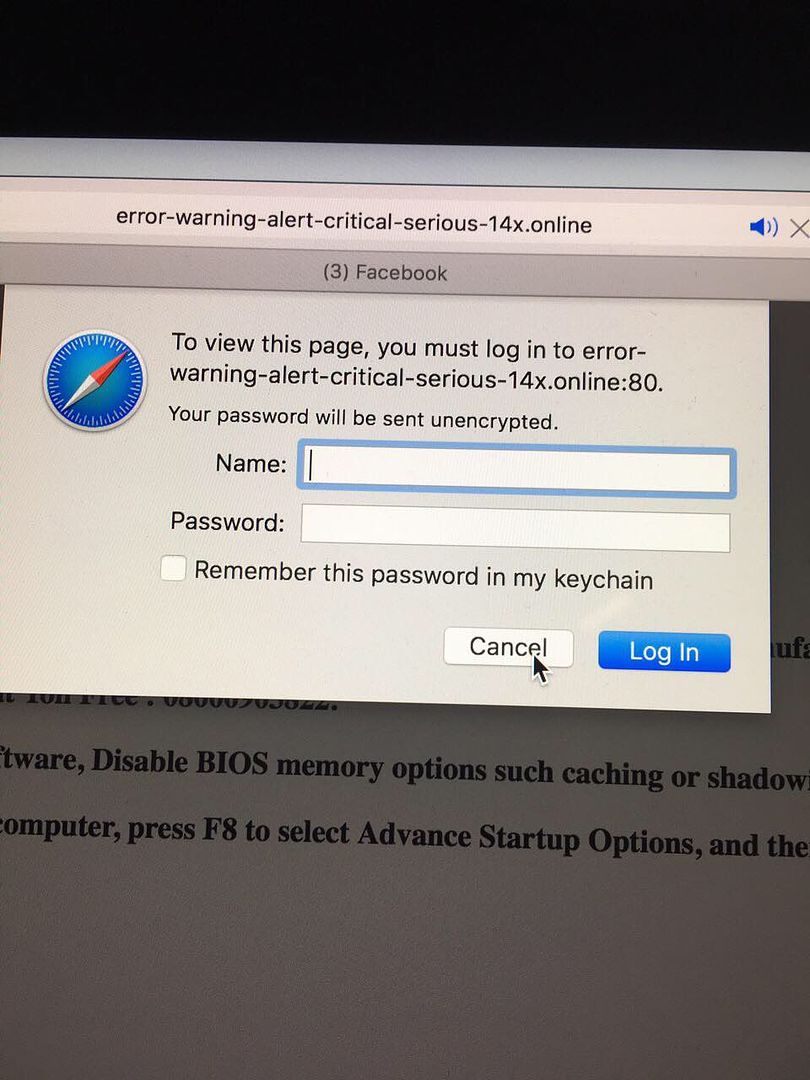
Yesterday Mrs. P was beside herself thinking that our family Mac was about to crash. God knows what sites she visits, but some scumbag, probably using a juicy bit "click bait" as a lure, managed to get this on her screen:
Elsewhere on the screen were these little missives...
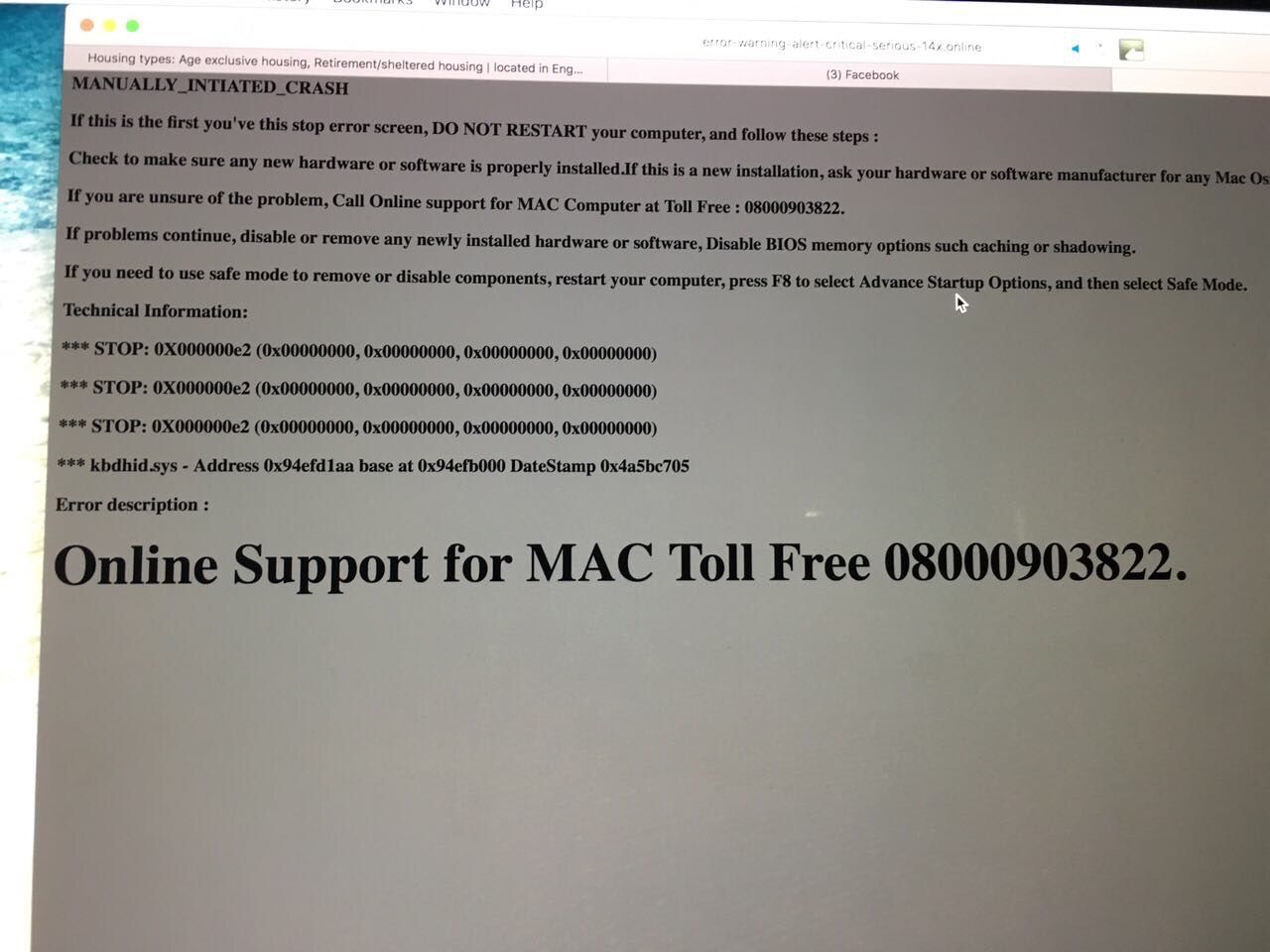
At the same time a very English voice suggested that she does not do any shopping as the computer has been compromised and that she does not turn off the computer but instead enters the details requested and then calls the number 0800 0903822. The other clever little trick about this wheeze was that it was very processor hungry, virtually denying you access to the mouse and keyboard.
The important thing is she did not do anything silly. But she also keeps forgetting we have a permanent back-up so if all else fails, we can recreate our Mac quite easily. She could have helped herself with 'Force Quit' but the second best thing in her case was to do nothing, which is what she did. Not wanting to go through 'Force Quit' over the phone we forced a power down. Job done. All resolved.
So just in case a chancer gets one of these images on your Mac..
PM
Elsewhere on the screen were these little missives...
At the same time a very English voice suggested that she does not do any shopping as the computer has been compromised and that she does not turn off the computer but instead enters the details requested and then calls the number 0800 0903822. The other clever little trick about this wheeze was that it was very processor hungry, virtually denying you access to the mouse and keyboard.
The important thing is she did not do anything silly. But she also keeps forgetting we have a permanent back-up so if all else fails, we can recreate our Mac quite easily. She could have helped herself with 'Force Quit' but the second best thing in her case was to do nothing, which is what she did. Not wanting to go through 'Force Quit' over the phone we forced a power down. Job done. All resolved.
So just in case a chancer gets one of these images on your Mac..
PM


Joined: Jul 1999
Posts: 3,933
Likes: 143
From: Warrington, UK
Not just on Macs:
who called me 08000903822 | who-called.co.uk
who called me 08000903822 | who-called.co.uk
Joined: May 2009
Posts: 2,847
Likes: 0
From: Confoederatio Helvetica
It looks like she was on Facebook when this happened. Perhaps they should be notified?
Interesting that;
They ask for a login and password, but don't say to what;
Disable BIOS memory options? On a Mac?;
Apple never refers to their comuters as MAC. They use Mac. MAC is Media Access Control in computer land.;
Etc.
You could have forced quit Safari (or any browser) by choosing Force Quit from the Apple () menu, or pressing Command-Option-Esc.
Interesting that;
They ask for a login and password, but don't say to what;
Disable BIOS memory options? On a Mac?;
Apple never refers to their comuters as MAC. They use Mac. MAC is Media Access Control in computer land.;
Etc.
You could have forced quit Safari (or any browser) by choosing Force Quit from the Apple () menu, or pressing Command-Option-Esc.
Joined: Apr 2009
Posts: 310
Likes: 2
From: `
May I suggest installing Malwarebytes for Mac and that sort of thing may be detected and stopped. I put it on all our machines, PCs that is, which has saved me many times from having to do a clean install of the wife's machine because she will click on ANYTHING that pops up, especially on FarceBork. It is also on my Mac but since that isn't really used so I don't know how effective it is on it, however, it is FREE so the price is right. 
Joined: May 2009
Posts: 2,847
Likes: 0
From: Confoederatio Helvetica
May I suggest installing Malwarebytes for Mac and that sort of thing may be detected and stopped. I put it on all our machines, PCs that is, which has saved me many times from having to do a clean install of the wife's machine because she will click on ANYTHING that pops up, especially on FarceBork. It is also on my Mac but since that isn't really used so I don't know how effective it is on it, however, it is FREE so the price is right.
It starts an automatic download to your downloads folder. This is not the behaviour you would expect in a Malware program. I would be very, very, very cautious with a program like this.
(Yes, that will teach me to click on anything that appears on the screen)
And heaven protect us from Mac Malware programs. They are worse than the real thing.
Joined: May 2009
Posts: 1,845
Likes: 21
From: YMML
Here's the Malwarebytes page with the above link: https://www.malwarebytes.com/mac/
Administrator
Joined: Mar 2001
Aviation Qualifications: PPL
Posts: 8,121
Likes: 686
From: Twickenham, home of rugby
It is not a dodgy site or company.
The URL had /download/ appended to the site URL https://www.malwarebytes.com/
I have removed the /download/ in both posts and the URL now just takes one to the Malwarebytes landing page.
SD
The URL had /download/ appended to the site URL https://www.malwarebytes.com/
I have removed the /download/ in both posts and the URL now just takes one to the Malwarebytes landing page.
SD
Joined: Nov 2015
Posts: 317
Likes: 0
From: Here
DONT PRESS ON THE LINK I'VE POSTED BELOW.
Funny, I opened up Safari, opened up Pprune, opened up this sub-forum, clicked on this thread and the screen went blank followed by this link:
Redirect
It seemed to want me to download and update my 'flash' installation.
What the heck is that all about. I closed down Safari and started again and it hasn't re-appeared despite going through the same click sequence.
Funny, I opened up Safari, opened up Pprune, opened up this sub-forum, clicked on this thread and the screen went blank followed by this link:
Redirect
It seemed to want me to download and update my 'flash' installation.
What the heck is that all about. I closed down Safari and started again and it hasn't re-appeared despite going through the same click sequence.
Joined: May 2009
Posts: 2,847
Likes: 0
From: Confoederatio Helvetica
yellowtriumph - probably an ad on the page requires Safari to use the Adobe. See https://forums.adobe.com/thread/2221806
Joined: Nov 2015
Posts: 317
Likes: 0
From: Here
Here's copy of the link, I've adulterated the http part so that it is not usable.
://testpconly12.prepare2upvideosafesystem4setnow.site/?pcl=7RD2Nzie5fRXJjLMoxij_1XlTu9CDsv8_npA5Kcjiy8.&cid=148621 65381453062342103994344955114&pubid=1327287-1464577180-2528587433&v_id=JMrq4-UvmqDB0vuP0E5OKBxWCYUDNGrw0IGj32CPy9k.
Any further thoughts? (I've taken off the 'http' at the start of the link, otherwise its as per original)
://testpconly12.prepare2upvideosafesystem4setnow.site/?pcl=7RD2Nzie5fRXJjLMoxij_1XlTu9CDsv8_npA5Kcjiy8.&cid=148621 65381453062342103994344955114&pubid=1327287-1464577180-2528587433&v_id=JMrq4-UvmqDB0vuP0E5OKBxWCYUDNGrw0IGj32CPy9k.
Any further thoughts? (I've taken off the 'http' at the start of the link, otherwise its as per original)
Joined: May 2009
Posts: 1,845
Likes: 21
From: YMML
Run the URL through this web site - it scan the URL, runs through where it goes and produces an image of what's at the end: urlquery.net - Free URL scanner
Joined: Nov 2015
Posts: 317
Likes: 0
From: Here
Le Pingouin, I reinstated the http and then pasted the complete link to the site as you suggested. It does show me the page I was re-directed to. I'm not clever enough to interpret the results I'm afraid. It does mention 'things' like Mozilla and Firefox etc, neither of which I have on the iMac.
Are you prepared to have a look and give me the benefit of your thoughts? Would be appreciated.
Are you prepared to have a look and give me the benefit of your thoughts? Would be appreciated.
Joined: May 2009
Posts: 1,845
Likes: 21
From: YMML
Mozilla, Firefox, etc are just part of the user agent string that can be passed to a website when you browse so you can be served customised content to suit your browser and OS.
In this case the URL scanning site is masquerading as a browser so passes the relevant parameters to elicit whatever response the target web site will give.
The results show the final destination (a page on wonderlandads.com) is listed on a blacklist site as containing malware and if you click on the image the report provides you'll see it purports to be an update to Flash Player. Shall we say it absolutely reeks.
For those interested the report is here:
urlquery.net - Free url scanner
In this case the URL scanning site is masquerading as a browser so passes the relevant parameters to elicit whatever response the target web site will give.
The results show the final destination (a page on wonderlandads.com) is listed on a blacklist site as containing malware and if you click on the image the report provides you'll see it purports to be an update to Flash Player. Shall we say it absolutely reeks.
For those interested the report is here:
urlquery.net - Free url scanner
Joined: May 2009
Posts: 1,845
Likes: 21
From: YMML
Out of curiosity I visited the dodgy URL you posted (please don't do this yourself) using various user agent strings - a browser identifying as Windows based got the Flash Player, Java, assorted video players updates and even a Firefox plug-in offered, Mac got an offer to clean and speed up the OS and Flash Player update (the download was a dmg file) and Linux got ads.
I downloaded a number of them and uploaded them to VirusTotal https://www.virustotal.com/ - they were all picked up as adware/malware.
As they say, don't try this at home!
It appears to be a redirector page - redirecting to all manner of pages serving dodgy ads, adware and malware.
I downloaded a number of them and uploaded them to VirusTotal https://www.virustotal.com/ - they were all picked up as adware/malware.
As they say, don't try this at home!
It appears to be a redirector page - redirecting to all manner of pages serving dodgy ads, adware and malware.
Joined: Nov 2015
Posts: 317
Likes: 0
From: Here
Many thanks le pengouin. As per my original post and query, all this came about as a result of simply clicking on a few pages here on Pprune on my iMac. I've not had this before or since. Glad I didn't go any further by the sound of it. Thanks again.
Joined: Aug 2007
Posts: 647
Likes: 0
Regretfully True
I've always allowed advertising on sites that prompt me to allow adverts for valid reasons (smaller technical sites for example). However I now use an addon called Ublock Origin as a security feature.
CAT III
Malvertising is not going away Folks
CAT III
Malvertising is not going away Folks