


By Great Deal

Thread Starter
Joined: Apr 2008
Posts: 218
Likes: 0
From: Uk
By Great Deal
I have no idea where this came from:
Whenever I hover over certain buttons this pops up. It isn't just PPrune, by the way. Happened on BBC Homepage, Photobucket. Something has crept in. Any ideas?
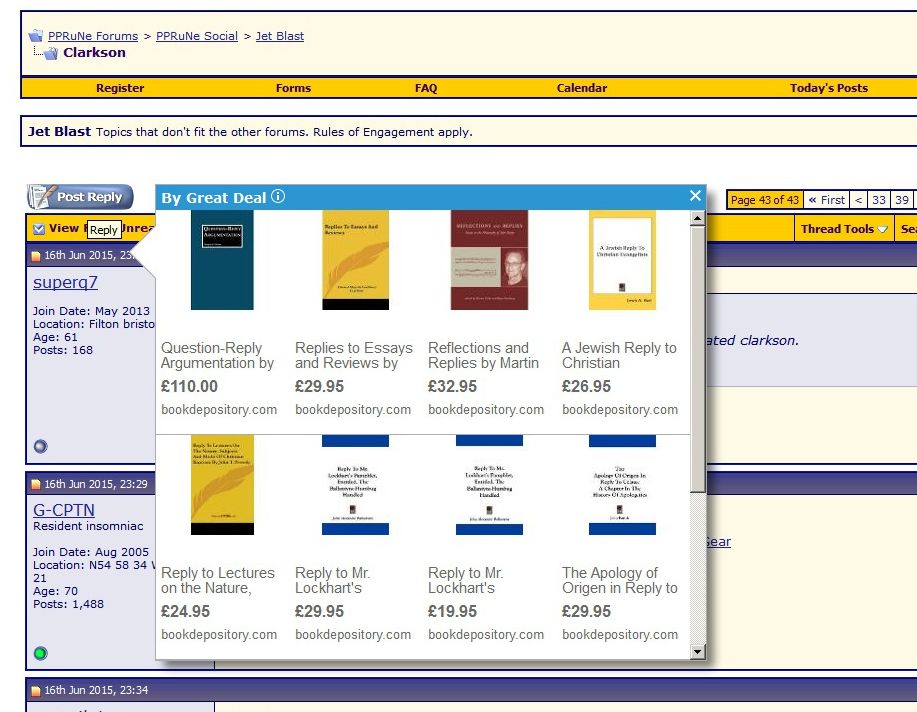
Whenever I hover over certain buttons this pops up. It isn't just PPrune, by the way. Happened on BBC Homepage, Photobucket. Something has crept in. Any ideas?

Administrator
Joined: Mar 2001
Aviation Qualifications: PPL
Posts: 8,121
Likes: 686
From: Twickenham, home of rugby
It looks awfully similar to the deal-finder PUP, so perhaps the advice for getting rid of that will work for you.
Just search for "deal finder pop up" on google.
SD
Just search for "deal finder pop up" on google.
SD

Administrator
Joined: Mar 2001
Aviation Qualifications: PPL
Posts: 8,121
Likes: 686
From: Twickenham, home of rugby
Hmm - are you aware that clicking on your post takes me into your photobucket account?
SD
Administrator
Joined: Mar 2001
Aviation Qualifications: PPL
Posts: 8,121
Likes: 686
From: Twickenham, home of rugby
Pelikal,
I would surmise that you took the image details from photobucket as an [IMG]somephoto.jpg[/IMG] string, and put it into your post as a link:
[ URL]http://somephoto.jpg[IMG]somephoto.jpg[/IMG][/URL ], as that is how it ended up. Note that I had to insert spaces at the start and end of that string to show what's going on.
The net effect of which is to embed the URL, but with the desired image as the placeholder text for the URL. Hence, clicking on the picture is actually clicking on the link to your public photobucket.
Just pasting [IMG]somephoto.jpg[/IMG] simply embeds the image, not the link.
In the standard PPRune editor, the Insert Image icon is the yellow one with a mountain in, and the Link icon is the one with the globe and a... link. The former puts the IMG wrapper around selected text, the latter puts the URL wrapper around selected text.
SD
I would surmise that you took the image details from photobucket as an [IMG]somephoto.jpg[/IMG] string, and put it into your post as a link:
[ URL]http://somephoto.jpg[IMG]somephoto.jpg[/IMG][/URL ], as that is how it ended up. Note that I had to insert spaces at the start and end of that string to show what's going on.
The net effect of which is to embed the URL, but with the desired image as the placeholder text for the URL. Hence, clicking on the picture is actually clicking on the link to your public photobucket.
Just pasting [IMG]somephoto.jpg[/IMG] simply embeds the image, not the link.
In the standard PPRune editor, the Insert Image icon is the yellow one with a mountain in, and the Link icon is the one with the globe and a... link. The former puts the IMG wrapper around selected text, the latter puts the URL wrapper around selected text.
SD

Joined: Dec 2005
Posts: 1,694
Likes: 15
From: Wellington,NZ
Try adwcleaner to remove it, and any other undesirables (PUPs) that may be lurking.

 .
.
Avoid imitations


Joined: Nov 2000
Aviation Qualifications: ATPL
Posts: 15,114
Likes: 1,088
From: Wandering the FIR and cyberspace often at highly unsociable times
I can recommend installing the free version of "Superantispyware" for annoying stuff like that.

Thread Starter
Joined: Apr 2008
Posts: 218
Likes: 0
From: Uk
Gawd, what a carry on. Before the two posted recommendations above appeared (thanks btw) I found some instructions to remove the Great Deal thingy.
1st instruction was to open programs and uninstall anything that one didn't recognise or was suspicious looking. I found something called YAC, Brazillian I think it was. So I thought, as I'm here, I'll uninstall that as I was pretty sure it shouldn't be there. Clicked uninstall and a window opened. The program looked like an anti-virus program which I didn't recognise and didn't install.
Started to uninstall, it reached 5% and went no further. Buggah, I'm thinking now this is a piece of malware in itself disguised as anti-malware and won't uninstall itself. I couldn't quit and close the window. I couldn't get anywhere so pulled the plug, so to speak. Upon restart, the machine was hopeless, couldn't do anything.
So forced it to start in Safe Mode which was ok. I had recently created a restore point so decided, rightly or wrongly, to revert to it (not something I had done before so I was a bit anxious). Well, it worked and the machine seemed to be behaving reasonably but YAC was still there. That wasn't the main concern as the whole point was getting rid of the Great Deal thing.
I downloaded "Superantispyware", ran it and it picked up YAC and other items, deleted that and I haven't had the GD popup appear yet either, so perhaps sorted. Stuff running quite smoothly.
I decided to create a new restore point and I got the following message:
"The Volume Shadow Copy service used by System Restore is not working."
Web search tells me to run System File Checker (sfc /scannow). I can't open the CMD window as administrator! error:
"The service cannot be started, either because it is disabled or because it has no enabled devices associated with it".
So I can't open Command Prompt to try and get The Volume Shadow Copy service used by System Restore working again...
Advice appreciated!!
1st instruction was to open programs and uninstall anything that one didn't recognise or was suspicious looking. I found something called YAC, Brazillian I think it was. So I thought, as I'm here, I'll uninstall that as I was pretty sure it shouldn't be there. Clicked uninstall and a window opened. The program looked like an anti-virus program which I didn't recognise and didn't install.
Started to uninstall, it reached 5% and went no further. Buggah, I'm thinking now this is a piece of malware in itself disguised as anti-malware and won't uninstall itself. I couldn't quit and close the window. I couldn't get anywhere so pulled the plug, so to speak. Upon restart, the machine was hopeless, couldn't do anything.
So forced it to start in Safe Mode which was ok. I had recently created a restore point so decided, rightly or wrongly, to revert to it (not something I had done before so I was a bit anxious). Well, it worked and the machine seemed to be behaving reasonably but YAC was still there. That wasn't the main concern as the whole point was getting rid of the Great Deal thing.
I downloaded "Superantispyware", ran it and it picked up YAC and other items, deleted that and I haven't had the GD popup appear yet either, so perhaps sorted. Stuff running quite smoothly.
I decided to create a new restore point and I got the following message:
"The Volume Shadow Copy service used by System Restore is not working."
Web search tells me to run System File Checker (sfc /scannow). I can't open the CMD window as administrator! error:
"The service cannot be started, either because it is disabled or because it has no enabled devices associated with it".
So I can't open Command Prompt to try and get The Volume Shadow Copy service used by System Restore working again...
Advice appreciated!!
Administrator
Joined: Mar 2001
Aviation Qualifications: PPL
Posts: 8,121
Likes: 686
From: Twickenham, home of rugby
Do you mean that you can't open a command prompt, or you can't open it as administrator?
If the former, can you open it directly from C:\Windows\System32 rather than from the shortcut?
If the latter, can you check the state of the Application Information Service (run services.msc)? It should be set to manual, not be disabled. Here's the description of the service:
What version of Windows are you running?
SD
If the former, can you open it directly from C:\Windows\System32 rather than from the shortcut?
If the latter, can you check the state of the Application Information Service (run services.msc)? It should be set to manual, not be disabled. Here's the description of the service:
Facilitates the running of interactive applications with additional administrative privileges. If this service is stopped, users will be unable to launch applications with the additional administrative privileges they may require to perform desired user tasks.
SD
Thread Starter
Joined: Apr 2008
Posts: 218
Likes: 0
From: Uk
SD, this is very good of you, providing such responses. I don't understand:
How would I do this?
If the latter, can you check the state of the Application Information Service (run services.msc)? It should be set to manual, not be disabled.
Administrator
Joined: Mar 2001
Aviation Qualifications: PPL
Posts: 8,121
Likes: 686
From: Twickenham, home of rugby
Start > Search programs and files > services.msc
That's what I meant by Run services.msc
It's to be found in %windir%\system32\services.msc
You will need to log on as the administrator to change anything, because elevating user privileges doesn't seem to be working for you.
Under normal circumstances you can also get to it by right-clicking "Computer" and selecting Manage - but that requires elevated privileges (it has the shield icon on it).
You may have to start in Safe Mode with Networking to get to the services console.
SD
That's what I meant by Run services.msc
It's to be found in %windir%\system32\services.msc
You will need to log on as the administrator to change anything, because elevating user privileges doesn't seem to be working for you.
Under normal circumstances you can also get to it by right-clicking "Computer" and selecting Manage - but that requires elevated privileges (it has the shield icon on it).
You may have to start in Safe Mode with Networking to get to the services console.
SD
Thread Starter
Joined: Apr 2008
Posts: 218
Likes: 0
From: Uk
Latest:
I booted in Safe Mode with networking. Ran CMD prompt as Administrator and performed sfc /scannow.
Windows Resource Protection found corrupt files but was unable to fix some of them. Details in log (haven't found that yet).
Opened Service Console. Noticed 'Volume Shadow Copy' is set to automatic.
Still confused by Application Information Service. Sorry, I'm probably being a bit dumb here.Still can't create a restore point, I'm giving this a break for the night!
I booted in Safe Mode with networking. Ran CMD prompt as Administrator and performed sfc /scannow.
Windows Resource Protection found corrupt files but was unable to fix some of them. Details in log (haven't found that yet).
Opened Service Console. Noticed 'Volume Shadow Copy' is set to automatic.
Still confused by Application Information Service. Sorry, I'm probably being a bit dumb here.Still can't create a restore point, I'm giving this a break for the night!
Thread Starter
Joined: Apr 2008
Posts: 218
Likes: 0
From: Uk
Sorted (he says reluctantly).
Finally able to create a restore point. Firstly was able to run services. Not sure what changed here but something nudged into action.
Original error message when trying to create a restore point:
The Volume Shadow Copy service used by System Restore is not working.
In Services, Volume Shadow Copy was set to Automatic but would not start.
What I found on the net was this:
I tried many solutions and the problem persisted. Then I stumbled across another important Service in Services.msc:
"Microsoft Software Shadow Copy Provider".
Properties: Automatic startup, apply and the Start. This finally fixed Volume Shadow Copy Service.
On my machine this service had clearly reverted to manual, probably with all the faffing about. Just thought I'd mention this fix.
Now if I had just used "Superantispyware" in the first instance. Or, of course, been more careful.
Original error message when trying to create a restore point:
The Volume Shadow Copy service used by System Restore is not working.
In Services, Volume Shadow Copy was set to Automatic but would not start.
What I found on the net was this:
I tried many solutions and the problem persisted. Then I stumbled across another important Service in Services.msc:
"Microsoft Software Shadow Copy Provider".
Properties: Automatic startup, apply and the Start. This finally fixed Volume Shadow Copy Service.
On my machine this service had clearly reverted to manual, probably with all the faffing about. Just thought I'd mention this fix.
Now if I had just used "Superantispyware" in the first instance. Or, of course, been more careful.
Hippopotomonstrosesquipidelian title
Joined: Oct 2006
Posts: 1,825
Likes: 1
From: is everything
Pelikal, the owners of YAC were caught in March stealing MalwareBytes MBAM malware database. MBAM trapped them by putting a fake virus definition called "Spywera.ThievingBastards". YAC probably doesn't detect/clean a great deal, right now 

