


Windows update

Thread Starter

Joined: Dec 2004
Posts: 733
Likes: 2
From: Andalucia
Windows update
This has been going on for a while, I get a notification that there are updates, fair enough.
I click to get the update.
The response is :
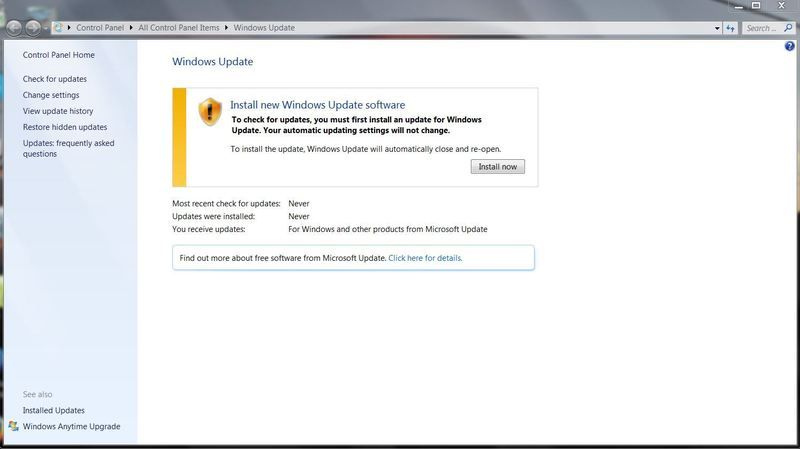
So i click to download the update to update :
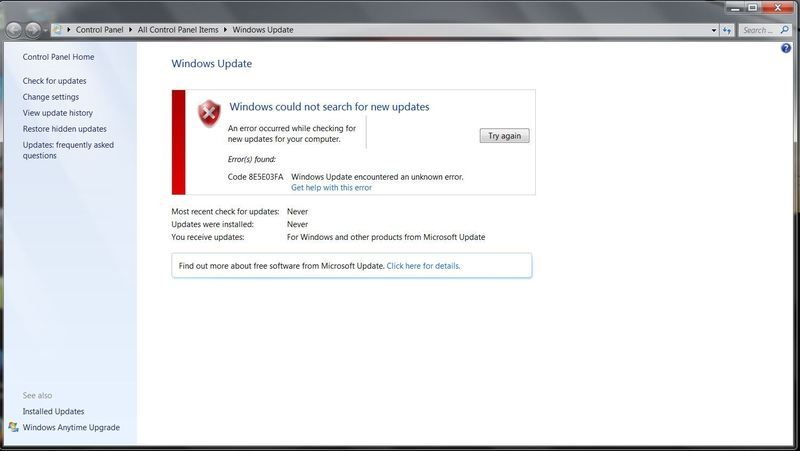
Round and round goes the wheel, any suggestions ?
W7 Home premium.
I click to get the update.
The response is :

So i click to download the update to update :

Round and round goes the wheel, any suggestions ?
W7 Home premium.

Administrator
Joined: Mar 2001
Aviation Qualifications: PPL
Posts: 8,121
Likes: 686
From: Twickenham, home of rugby
Initially you should google the specific error number you have and see if any of the solutions clear the problem.
Here's a useful link for general Windows Update problem resolution: https://support.microsoft.com/en-us/kb/971058.
Windows update can be a weird thing - I had one Windows server 2008 system that would not update because there was no valid time source specified.
SD
Here's a useful link for general Windows Update problem resolution: https://support.microsoft.com/en-us/kb/971058.
Windows update can be a weird thing - I had one Windows server 2008 system that would not update because there was no valid time source specified.
SD
Joined: Oct 2013
Posts: 380
Likes: 0
From: Wengen
Cure
1. Remove all security software.
2. Get rid of all crap that you don't use.
3. Power down.
4. Remove battery.
5. Keep power button depressed for at least 30 seconds to get rid of residual juice and remove any electrical supply.
6. Power up.
7. Hit Windows Update
8. If I don't work, don't worry because W7 have mega monthly updates so the next one should be around June.
2. Get rid of all crap that you don't use.
3. Power down.
4. Remove battery.
5. Keep power button depressed for at least 30 seconds to get rid of residual juice and remove any electrical supply.
6. Power up.
7. Hit Windows Update
8. If I don't work, don't worry because W7 have mega monthly updates so the next one should be around June.


Joined: May 2007
Aviation Qualifications: PPL
Posts: 1,642
Likes: 264
From: Dark side of the Moon
1. Remove all security software.
2. Get rid of all crap that you don't use.
3. Power down.
4. Remove battery.
5. Keep power button depressed for at least 30 seconds to get rid of residual juice and remove any electrical supply.
6. Power up.
7. Hit Windows Update
8. If I don't work, don't worry because W7 have mega monthly updates so the next one should be around June.
2. Get rid of all crap that you don't use.
3. Power down.
4. Remove battery.
5. Keep power button depressed for at least 30 seconds to get rid of residual juice and remove any electrical supply.
6. Power up.
7. Hit Windows Update
8. If I don't work, don't worry because W7 have mega monthly updates so the next one should be around June.

Honestly, I've not seen such mumbo-jumbo for ages, so I assume it's a wind-up.
FBW

Joined: Jul 2010
Posts: 624
Likes: 0
From: East sussex
Had the same problem last year, also could not update my AV software. Turned out to be a nasty I picked up on my internet travels. Did a complete re install, sorted. I'm not saying this might apply to you, but a possible 'heads up'
Daz
Daz
Thread Starter
Joined: Dec 2004
Posts: 733
Likes: 2
From: Andalucia
Well SD I have googled the error before as I am familiar with the technique, but it has never returned a positive result I have always ended with various software telling me the error was unknown, however this time I have been directed to a Forum with detailed info on how to get rid of this particular error code and get update working. Senior Management currently has other uses for my body but when I have the time to try I will,and will report.
Thanks for now.
Thanks for now.

Joined: Jul 2000
Posts: 794
Likes: 8
From: Wiltshire
Vulcanised
Unless you are not connected to the internet, that sounds pretty stupid to me! Many updates are designed to overcome security weaknesses - by not installing them, you're leaving yourself wide open.
Joined: Jul 2010
Posts: 624
Likes: 0
From: East sussex
vulcanised..."For well over 20 years, and nothing nasty" ? That would be from 1995 I'm confused. Having said that, I do side with you, with aspects of updating.
Myself, I've always been slightly 'sus' of AV companies who rattle the sabre suggesting 'you need us' Scaring us chickens that the fox is around the coup.
I'm confused. Having said that, I do side with you, with aspects of updating. Myself, I've always been slightly 'sus' of AV companies who rattle the sabre suggesting 'you need us' Scaring us chickens that the fox is around the coup.
Joined: Mar 2008
Posts: 423
Likes: 1
From: Malvern, UK
Now here we are on Wednesday evening. A spare hour to do some tinkering on the computer. But hey no - twenty four important updates to install!! Great, back to my true vocation in life - doing Microsoft's own maintenance for them. Last week there were only three updates. This week Microsoft have really excelled themselves.
Just a couple of questions...
I have now added over 100 updates to Windows 8. How many more disrupted evenings and delayed morning start-ups (preparing to reconfigure Windows - 30% complete for the last 15 minutes, but we don't feel any need to tell you how many more minutes before we move on from that number!!!) before Windows 8 is actually properly fixed and working?
Have Microsoft at any point considered creating an operating system that is fit for purpose actually BEFORE they release it?
Just a couple of questions...
I have now added over 100 updates to Windows 8. How many more disrupted evenings and delayed morning start-ups (preparing to reconfigure Windows - 30% complete for the last 15 minutes, but we don't feel any need to tell you how many more minutes before we move on from that number!!!) before Windows 8 is actually properly fixed and working?
Have Microsoft at any point considered creating an operating system that is fit for purpose actually BEFORE they release it?
Joined: Apr 2008
Aviation Qualifications: SLF
Posts: 1,117
Likes: 228
From: troposphere
All operating systems need updating throughout their lifetime.A lot of the updates are to do with security,the bad guys are always working to compromise systems and so patches need to be developed.Some updates are to patch bugs that have come to light.
As for the updates interrupting your use of the machine,you can install the updates at a time of your choosing if you switch off automatic updating.As Windows updates are usually available on a monthly basis,I just check each month and then download/update while I'm doing something else,such as having dinner.
As for the updates interrupting your use of the machine,you can install the updates at a time of your choosing if you switch off automatic updating.As Windows updates are usually available on a monthly basis,I just check each month and then download/update while I'm doing something else,such as having dinner.
Joined: Mar 2002
Aviation Qualifications: ATPL
Posts: 9,217
Likes: 981
From: Seat 1A
I don't mind updates but the second bunch in as many months to fail with one update throwing up the red flag. At least I didn't need to do a full wind-back like last time...


