


Firefox 20, downloads

Thread Starter
Per Ardua ad Astraeus
Joined: Mar 2000
Posts: 18,575
Likes: 4
From: UK
Firefox 20, downloads
Until this am, FF always saved downloads in the selected folder /user/xxx/downloads. This folder still has all my previous downloads in, but if I download today I get an empty 'download' folder. I have reset the location several times, but if I now select 'Downloads' it takes me to a tree headed 'Library' and an empty folder (second down below 'History') titled Downloads. I cannot see anything relevant in the Mozilla profile. Where in about:config is the download location stored or where else do I look?
If I run as admin, FF still correctly shows downloaded items.
If I run as admin, FF still correctly shows downloaded items.

Thread Starter
Per Ardua ad Astraeus
Joined: Mar 2000
Posts: 18,575
Likes: 4
From: UK
Yes - I had to do that in XP, so I'll give it a go.
Edit: No change - still will not accept the chosen location and reverts to the empty 'downloads' folder as per post #1.
Edit: No change - still will not accept the chosen location and reverts to the empty 'downloads' folder as per post #1.
Last edited by BOAC; 26th April 2013 at 10:25.
More bang for your buck
Joined: Nov 2005
Posts: 3,513
Likes: 1
From: land of the clanger
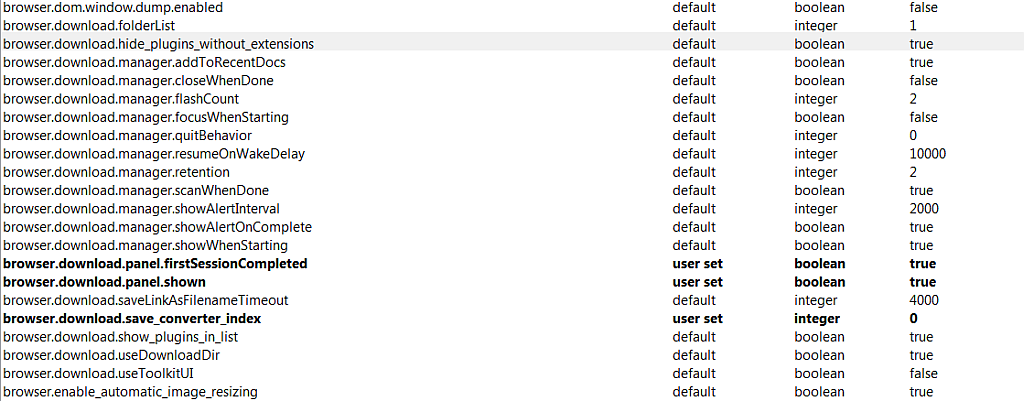
Hmmmm I tend to use palemoon nowadays but it's the same thing (firefox) but optimised for windows, no problems with V20 of that. So I opened FireFox and updated it to V20 and there's no problem either it still downloads to the normal download folder. I've copied the relevent bit from about:config for you to compare with my FireFox V20:

Thread Starter
Per Ardua ad Astraeus
Joined: Mar 2000
Posts: 18,575
Likes: 4
From: UK
gg - thanks for the pointers. Very strange! In about:config the user set directory is absolutely correct BUT when I 'open the download folder' is opens user/AppData/Local/Temp where today's downloads indeed are, and not user/downloads where it should.
I had an update to Win7 yesterday and am wondering if this is a Windows thing rather than a Firefox? I have checked the reg entries and they all seem ok.
I had an update to Win7 yesterday and am wondering if this is a Windows thing rather than a Firefox? I have checked the reg entries and they all seem ok.
Thread Starter
Per Ardua ad Astraeus
Joined: Mar 2000
Posts: 18,575
Likes: 4
From: UK
Ta - cannot see anything on Google about downloads opening in appdata. I would normally suspect a corrupt user profile except the reg settings are ok.
I have set FF to 'ask' about download location for the time being.I still see the correct folder if I run as admin.
I have set FF to 'ask' about download location for the time being.I still see the correct folder if I run as admin.
More bang for your buck
Joined: Nov 2005
Posts: 3,513
Likes: 1
From: land of the clanger
Thread Starter
Per Ardua ad Astraeus
Joined: Mar 2000
Posts: 18,575
Likes: 4
From: UK
Thanks - worked through that with no real change, BUT I now download into the right folder. Only problem is that while all the files going back to xxxx are actually there in that folder, when I open the folder (via FF), although it is now opening the correct download folder, I only see the downloads of today onwards. Opening it via Explorer shows all downloads including today's.
So - two forward and one back? The mystery deepens.
So - two forward and one back? The mystery deepens.
Thread Starter
Per Ardua ad Astraeus
Joined: Mar 2000
Posts: 18,575
Likes: 4
From: UK
Le P - what would cause the entries to be removed? I have not done that. Also does not explain FF opening the temp folder at one point although that seems to have cleared.
EDIT@ I think I have the answer to the first part - my 'History' now covers only today and yesterday whereas before it went back weeks. Again - no selection from me. I had run CCleaner but 'history' was deselected.
EDIT@ I think I have the answer to the first part - my 'History' now covers only today and yesterday whereas before it went back weeks. Again - no selection from me. I had run CCleaner but 'history' was deselected.
Last edited by BOAC; 26th April 2013 at 16:03.

Official PPRuNe Chaplain
Joined: Apr 2001
Posts: 3,498
Likes: 0
From: Witnesham, Suffolk
My old schoolteachers (1949-55) had the right attitude and imparted it to me...
You WILL obey!
I got very cross with Microsoft creating "default" locations for my stuff, buried deep where I couldn't find them. I set up my own locations: Drive I for Internet, folder "Downloads". I managed to persuade Windows that no other place exists where downloads may go. It works well.
E-mail likewise goes in I:/Mail rather than umpty levels down on C:
You WILL obey!
I got very cross with Microsoft creating "default" locations for my stuff, buried deep where I couldn't find them. I set up my own locations: Drive I for Internet, folder "Downloads". I managed to persuade Windows that no other place exists where downloads may go. It works well.
E-mail likewise goes in I:/Mail rather than umpty levels down on C:
