


Advertisement appearing in wrong place

Thread Starter


Joined: Oct 2009
Posts: 1,235
Likes: 112
From: Australia
Advertisement appearing in wrong place
Macbook pro running OSX 10.7.5
Every so often an advertisement for concrete paving (it's one that sometimes appears at the bottom of the page) appears at the top left corner of the forums list. It's not as big as when it appears at the bottom, but is big enough to block out the topic etc.
I can stop it happening for a while by clearing all cookies, but I wonder if this happens to anyone else, and what causes it. It seems to be only this ad, and only on PPRuNe.
Every so often an advertisement for concrete paving (it's one that sometimes appears at the bottom of the page) appears at the top left corner of the forums list. It's not as big as when it appears at the bottom, but is big enough to block out the topic etc.
I can stop it happening for a while by clearing all cookies, but I wonder if this happens to anyone else, and what causes it. It seems to be only this ad, and only on PPRuNe.

Guest

Joined: Mar 2011
Posts: 673
Likes: 0
From: El Segundo
Hydromet, let us know what browser you're using.
Please also let us know the name of the advertiser (if you can see it).
Finally, please mouse over the ad, right click to save the link, and paste the whole code here. If it's a Flash ad (and thus has no right-clickable link), let us know that also and capture and paste a screenshot if possible.
These details will help us track down the ad. Thanks!
Please also let us know the name of the advertiser (if you can see it).
Finally, please mouse over the ad, right click to save the link, and paste the whole code here. If it's a Flash ad (and thus has no right-clickable link), let us know that also and capture and paste a screenshot if possible.
These details will help us track down the ad. Thanks!

Thread Starter
Joined: Oct 2009
Posts: 1,235
Likes: 112
From: Australia
OK, this happened for the first time in ages today. The advertiser is always Berger. It doesn't seem to have a right-clickable link. I've taken a screen shot, but I can only post images from an external link, and I don't use a pic hosting site.
The best I can describe it is that on the very first pprune page, it sits over, and blocks out the thread title 'Rumours & News' plus some of the surrounding text. Hope this helps. If you can temporarily allow me to post a .jpg file I'll post the screenshot.
The best I can describe it is that on the very first pprune page, it sits over, and blocks out the thread title 'Rumours & News' plus some of the surrounding text. Hope this helps. If you can temporarily allow me to post a .jpg file I'll post the screenshot.
Guest
Joined: Mar 2011
Posts: 673
Likes: 0
From: El Segundo
Adding screenshot below provided by user.
Is anybody else seeing this ad behavior, either while logged in or not?
To my knowledge, we don't even run an ad in that position, so I'm wondering if this issue is user-specific.
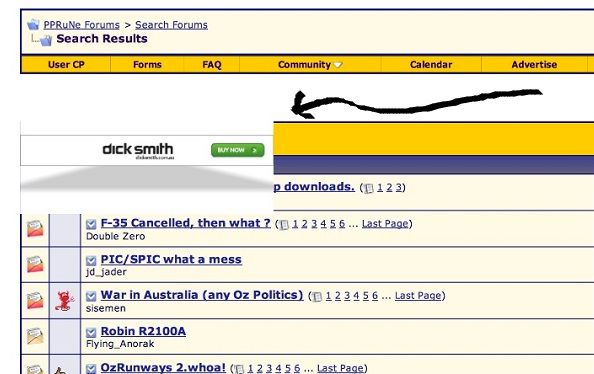
Is anybody else seeing this ad behavior, either while logged in or not?
To my knowledge, we don't even run an ad in that position, so I'm wondering if this issue is user-specific.

Joined: Aug 1999
Aviation Qualifications: ATP+Mil
Posts: 4,411
Likes: 83
From: Gold Coast, Australia
Similar random issue for me on Safari 6.0.3, always the same Huawei advert and never on Firefox. Clearing cookies got rid of it for a day or two, but still the occasional reappearance.
Right click only brings up Flash options, and there's no way that I'm game to open the link!

Right click only brings up Flash options, and there's no way that I'm game to open the link!
Joined: Aug 2008
Posts: 490
Likes: 0
From: Spain
I'm running Safari 6.0.3 on OSX 10.8.3. I use an ad blocker but I've disabled it and so far I have had no problem with the rendering of any of your ads and have had no pop-ups as described. I'll leave my ad-blocker off and see what happens.

Joined: Feb 2004
Posts: 714
Likes: 1
From: Here

Windows 7 x64
Version 30.0.1599.101 m (Google Chrome is up to date)
When you click on the link this pops up really quickly (I had to screen capture to read it), then moves on to the ad page...

Just checked - not getting it with IE 10.
Joined: Jan 2008
Posts: 1,133
Likes: 0
From: Bracknell, Berks, UK
I'm using SRWare Iron version 27.0.1500.0 (basically a Chromium fork with the latest release) as my browser, but i'd expect to see the same issue with Chrome.