


Internet Explorer freezes up. Help!

Joined: Jan 2012
Posts: 2,173
Likes: 0
From: .
Pop
If you've had the Alot toolbar on there its a good bet that you've got other nasties as well. That piggybacks onto other malware thats usually hidden as a free download of some kind or another
Difficult to offer advice without seeing the machine, or remoting into it
However, assuming you're running XP, run these programs, in safe mode
ATF Cleaner ATF-Cleaner.exe - www.atribune.org
Hitman Pro Downloads - SurfRight
Combofix ComboFix Download
Run ALL, and run in safe mode
first one just cleans up junk, the others sanitise the machine
But resetting IE to its defaults is important, otherwise the changes made by the malware remain
If you've had the Alot toolbar on there its a good bet that you've got other nasties as well. That piggybacks onto other malware thats usually hidden as a free download of some kind or another
Difficult to offer advice without seeing the machine, or remoting into it
However, assuming you're running XP, run these programs, in safe mode
ATF Cleaner ATF-Cleaner.exe - www.atribune.org
Hitman Pro Downloads - SurfRight
Combofix ComboFix Download
Run ALL, and run in safe mode
first one just cleans up junk, the others sanitise the machine
But resetting IE to its defaults is important, otherwise the changes made by the malware remain
Last edited by Milo Minderbinder; 14th October 2012 at 11:16.

Joined: Jan 2012
Posts: 2,173
Likes: 0
From: .
lasernigel
some questions
how much RAM in the machine
which version of windows?
which antivirus program
and have you checked if the hard drive is full? how much space is left on it?
handsfree
that update should have cured any software corruption problems unless theres a malware problem as well
some questions
how much RAM in the machine
which version of windows?
which antivirus program
and have you checked if the hard drive is full? how much space is left on it?
handsfree
that update should have cured any software corruption problems unless theres a malware problem as well
Cool Mod
Joined: Apr 1998
Posts: 6,189
Likes: 0
From: 18nm N of LGW
Milo,
A trip into registry revealed two problems, AVG which I never use and McAfee I just deleted them and one or two other things I recognized as useless - or not any use anymore. Came back and IE is working normally again. So far...............................!
A trip into registry revealed two problems, AVG which I never use and McAfee I just deleted them and one or two other things I recognized as useless - or not any use anymore. Came back and IE is working normally again. So far...............................!
OLD RED DAMASK
Joined: Apr 2004
Posts: 367
Likes: 0
From: Lancashire born. In Cebu now
Milo
how much RAM in the machine 4Gb it says I'm using 90%, though I'm only running this page
which version of windows? Win 7
which antivirus program Malawares and Macafee
and have you checked if the hard drive is full?
how much space is left on it?
390Gb
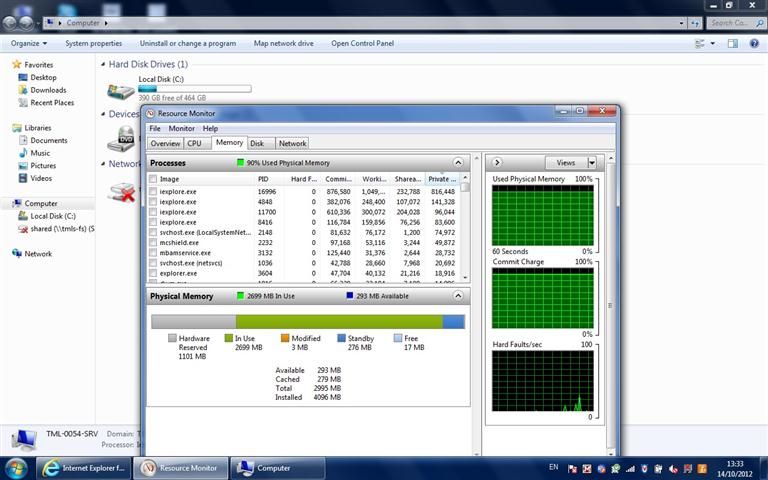
how much RAM in the machine 4Gb it says I'm using 90%, though I'm only running this page
which version of windows? Win 7
which antivirus program Malawares and Macafee
and have you checked if the hard drive is full?
how much space is left on it?
390Gb
Last edited by lasernigel; 14th October 2012 at 12:40.

Joined: Sep 2006
Posts: 638
Likes: 18
From: South Oxfordshire
We have had problems with IE9 freezing on certain sites (not seen this problem previously). Has happened over the last couple of weeks. At the same time I noticed that some automatic updates were failing to install. which may be just a coincidence. One I have had to hide for the moment is the latest Skype update.
To cut a long story short, we swapped to Chrome a couple of days ago, and we are not seeing any problems at all using it. In fact, my wife is now able to upload stuff to her work website again which she hasn't been able to do from our desktop machine since we "upgraded" to IE9 some time ago.
So not a solution exactly, but it's made our web browsing a whole lot less frustrating
To cut a long story short, we swapped to Chrome a couple of days ago, and we are not seeing any problems at all using it. In fact, my wife is now able to upload stuff to her work website again which she hasn't been able to do from our desktop machine since we "upgraded" to IE9 some time ago.
So not a solution exactly, but it's made our web browsing a whole lot less frustrating
Joined: Jul 2001
Posts: 805
Likes: 0
From: U.K.
Being a person who believes in using XP for as long as possible and also using I.E. 8 (I know, I know) I have been getting fed up with the browser hanging - usually on PPRuNe but also on some others. The program then locks up and often recovers itself. Of course this problem went away if I remembered to run Firefox instead of I.E. but I have just discovered that on disabling all the add-ons as suggested here seems to cure the problem and the browser is now running much faster than before. Of course PPRuNe and other sites moan that they can't find an addon that they want, but it does not stop them running. I think most of my addons will continue to be disabled!
P.P.
P.P.
Cool Mod
Joined: Apr 1998
Posts: 6,189
Likes: 0
From: 18nm N of LGW
P.P - that's about it really. Mine was in a terrible state but I went one stage further after checking add ons that can be a pain, and getting rid of unused progs. I then went to the registry via 'run' / regedit. I removed a lot of residue stuff that hopes you will go back sometime. It works I can tell you and I have a very fast browser again and all is really well. But, you have to be very careful in there and ONLY delete somthing you know to be useless or part of a little trick. Avoid missing almost hidden add ons that are like leeches when you might download something you want.
After a miserable week of rubbish plaguing me I'm now a happy bunny.
A further tp. After opening IE let it load fully for a few seconds.
Have to say that Milo's advices have been a real help. Good quality advice.
PPP
After a miserable week of rubbish plaguing me I'm now a happy bunny.
A further tp. After opening IE let it load fully for a few seconds.
Have to say that Milo's advices have been a real help. Good quality advice.
PPP
Joined: Jul 2001
Posts: 805
Likes: 0
From: U.K.
Thanks for that PPP I am now having fun trying to find which of the addons permits me to view embedded pictures/movies as I only get a dimmed page at the moment but I have no doubt I will succeed in the end. After all, Firefox works perfectly. Another thing I've noticed is that without the addons, PPRuNe seems to have lost its ads.......... Shhh!
P.P.
P.P.
Joined: Feb 2007
Posts: 755
Likes: 26
From: Dublin, Ireland. (No, I just live here.)
You can also manage Add-Ons directly from Control Panel, and load IE in "safe mode" without add-ons. Mode details here: Troubleshooting and Internet Explorer


