


Networking laptop & desktop

Thread Starter
Joined: Feb 2008
Posts: 15
Likes: 0
From: United States of Europe
Networking laptop & desktop
Good afternoon!
A question about networking (think that's the correct term!) my laptop with my desktop.
You see, my desktop is connected to ADSL via the telephone socket & cable. My laptop only has a wireless card and I do not wish to invest in the kit to go wireless just now if I can help it.
Is there a method of connecting my laptop to my desktop so I can transfer files and share the broadband connection??? I recall an article I found on the internet which involved a cable with a little electronic box of tricks mid-line to enable me to do this, but not being too up on this sort of thing, I may have mis-understood it all.
Any help greatly appreciated. Thank you.
A question about networking (think that's the correct term!) my laptop with my desktop.
You see, my desktop is connected to ADSL via the telephone socket & cable. My laptop only has a wireless card and I do not wish to invest in the kit to go wireless just now if I can help it.
Is there a method of connecting my laptop to my desktop so I can transfer files and share the broadband connection??? I recall an article I found on the internet which involved a cable with a little electronic box of tricks mid-line to enable me to do this, but not being too up on this sort of thing, I may have mis-understood it all.
Any help greatly appreciated. Thank you.

Joined: Jan 2008
Posts: 798
Likes: 0
From: The Land of Beer and Chocolate
Your laptop should have an RJ45 Ethernet port on it, so you can buy what is called a "crossover cable" (http://www.aria.co.uk/Products/Perip...roductId=28990 ) which plugs into the ethernet ports on the laptop and desktop.
That's it, no need for routers, etc
That's it, no need for routers, etc
Joined: Feb 2003
Posts: 144
Likes: 0
From: Scotland
Get a wireless USB device for your desktop. Set up an ad hoc wireless network using the network wizard. From the desktop you share your broadband connection. You can also share printers and file folders. The network wizard can write setup files to a USB Flash memory which you then take to the laptop to help set it up.
No need for routers etc. You do need to keep the desktop running when you want to use the laptop.
No need for routers etc. You do need to keep the desktop running when you want to use the laptop.
Administrator
Joined: Mar 2001
Aviation Qualifications: PPL
Posts: 8,121
Likes: 686
From: Twickenham, home of rugby
my desktop is connected to ADSL via the telephone socket & cable
Famouswhendead - please tell us what your desktop PC and laptop make and models are.
Also, please tell us what the cable is that connects your PC to the ADSL modem - look at the plug at the end of the cable and see if it is like this:
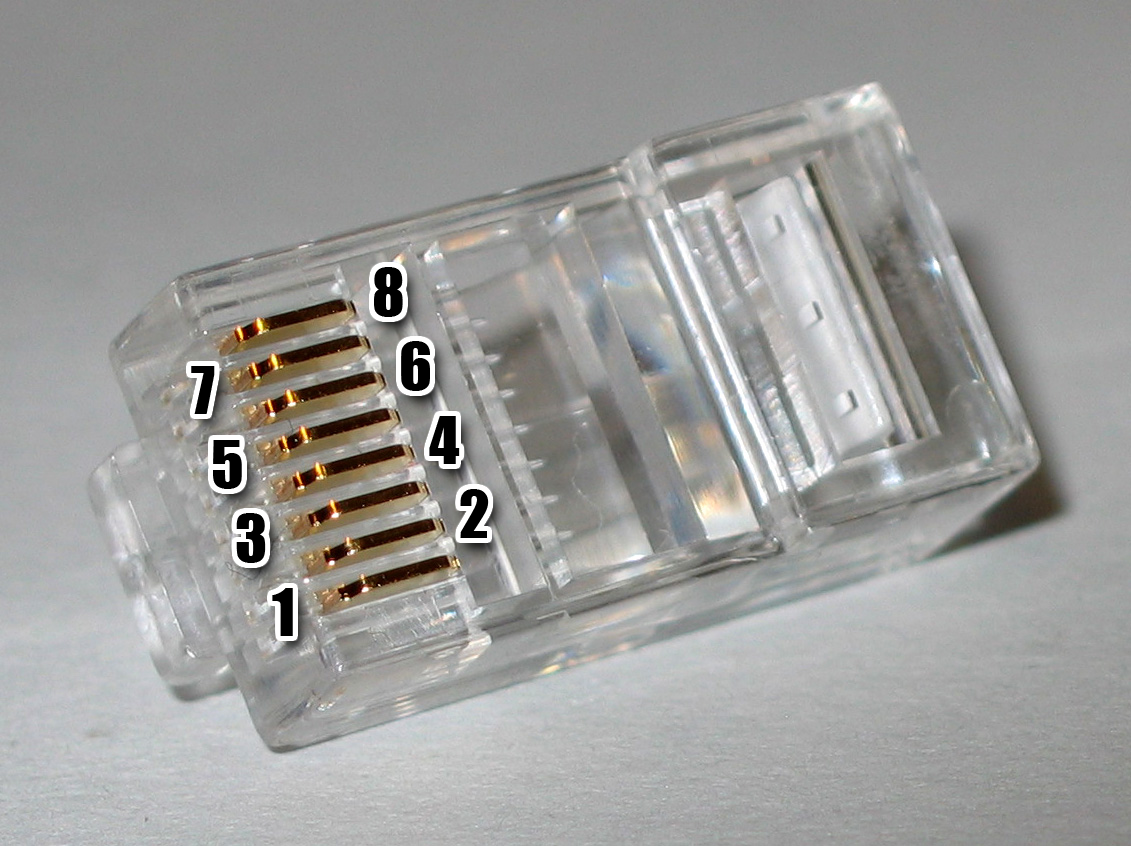

If it is, then you are connecting via RJ45 ethernet. Is there a similar socket on your laptop?
SD

Joined: Feb 2007
Posts: 755
Likes: 26
From: Dublin, Ireland. (No, I just live here.)
Is the desktop running XP or Vista? You can set up Internet Connection Sharing (ICS) on the ADSL collection, which should be as simple as going to that connection, saying "Share" and following the instructions. Then, once you make the basic connection between notebook and desktop (wired or wireless, as described in other replies), the Desktop acts like a router, including handing out
IP addresses.
A friend of mine did exactly this, a few years ago - worked fine, the computers all saw each other and the Internet.
IP addresses.
A friend of mine did exactly this, a few years ago - worked fine, the computers all saw each other and the Internet.
Joined: Jan 2008
Aviation Qualifications: Non-Aircrew
Posts: 340
Likes: 173
From: UK
Unless I mis-read the orignal post what's wanted is the way to physically connect the laptop & PC ... we know the laptop has built in wireless and the PC is connected to the internet with ADSL via a cable.
FWD wants to get the laptop into the loop without getting wireless capability on the PC....
If we knew how the internet "cable" connected to the PC/phone we could better advise.
Thats why I'd asked earlier "Where exactly does the lead from your telephone socket go? "
Options might be:
1. If the PC's internet conx is via a wireless enabled modem router then just wireless conx through that (guessing not so which is why the question!) [This option is good as laptop can conx to internet without PC being switched on].
2. If the PC's conx is via a modem router with ethernet ports then a standard networking cable would allow the laptop (most laptops for some time have had RJ45 ports) to be connected to the router that way and share the internet conx. [Again a good option which means the PC doesn't need to be switched on].
3. If the PC's conx is via a USB modem and the PC has an RJ45 port then use that. If it doesn't have a network (RJ45) port then it won't work without something being added! [Worst option, IMHO, as it will need the PC to be on to connect to the internet].
If it needs the PC to be provided with the ability to connect to the laptop then I'd suggest going for a PC wireless PCI card, as long as there's a spare slot for it!!! They can be had for less than £14.00 these days.
Of course this is what the original post asked to avoid if possible!!!!
Actually getting the two talking to each other & the internet is not really difficult once you can actually connect them......
FWD wants to get the laptop into the loop without getting wireless capability on the PC....
If we knew how the internet "cable" connected to the PC/phone we could better advise.
Thats why I'd asked earlier "Where exactly does the lead from your telephone socket go? "
Options might be:
1. If the PC's internet conx is via a wireless enabled modem router then just wireless conx through that (guessing not so which is why the question!) [This option is good as laptop can conx to internet without PC being switched on].
2. If the PC's conx is via a modem router with ethernet ports then a standard networking cable would allow the laptop (most laptops for some time have had RJ45 ports) to be connected to the router that way and share the internet conx. [Again a good option which means the PC doesn't need to be switched on].
3. If the PC's conx is via a USB modem and the PC has an RJ45 port then use that. If it doesn't have a network (RJ45) port then it won't work without something being added! [Worst option, IMHO, as it will need the PC to be on to connect to the internet].
If it needs the PC to be provided with the ability to connect to the laptop then I'd suggest going for a PC wireless PCI card, as long as there's a spare slot for it!!! They can be had for less than £14.00 these days.
Of course this is what the original post asked to avoid if possible!!!!
Actually getting the two talking to each other & the internet is not really difficult once you can actually connect them......

Joined: Jul 2003
Aviation Qualifications: PPL
Posts: 257
Likes: 0
From: Canada (Southeastern Québec)
Wireless routers are plenty cheap, and have ethernet ports on the back in addition to being able to connect wirelessly. Get a router, locate the router and desktop next to the ADSL modem, plug the ADSL modem into the router's WAN port assuming the modem has an RJ45 cable, plug the desktop into one of the LAN (ethernet) ports with another RJ45, and connect the laptop via WPA-2 encrypted wireless. Both machines will be Internet-capable, you will be able to share data between them, and both systems end up sitting behind a hardware firewall (the router).
With the router and WPA-2 you will have a great firewall. Cheap insurance.
With the router and WPA-2 you will have a great firewall. Cheap insurance.
Thread Starter
Joined: Feb 2008
Posts: 15
Likes: 0
From: United States of Europe
Afternoon all.
Many thanks for all your replies and suggestions! I haven't been around for the weekend, hence my late post in reply...... my apologies.
Yes, the desktop runs from an ADSL router. The router is the one connected via a cable to the splitter in the telephone socket. The PC is an Advent, circa 2003/4, but still quite nippy!
The laptop does indeed have a RJ45 port. Laptop is a Gateway MA3, circa 2007.
What I want to do is share the connection and be able to transfer files across the two computers. Therefore, if I read your suggestions correctly, the easiest and most cost effective way of me to do this would be via a standard RJ45 cable then? Bearing in mind this is only going to be a short-term way of doing things, for convenience, and thus cheapest!
Thank you once more.
Many thanks for all your replies and suggestions! I haven't been around for the weekend, hence my late post in reply...... my apologies.
Yes, the desktop runs from an ADSL router. The router is the one connected via a cable to the splitter in the telephone socket. The PC is an Advent, circa 2003/4, but still quite nippy!
The laptop does indeed have a RJ45 port. Laptop is a Gateway MA3, circa 2007.
What I want to do is share the connection and be able to transfer files across the two computers. Therefore, if I read your suggestions correctly, the easiest and most cost effective way of me to do this would be via a standard RJ45 cable then? Bearing in mind this is only going to be a short-term way of doing things, for convenience, and thus cheapest!
Thank you once more.
Administrator
Joined: Mar 2001
Aviation Qualifications: PPL
Posts: 8,121
Likes: 686
From: Twickenham, home of rugby
OK,
Please clarify:
Does your ADSL router have only one available connection (currently used by the desktop PC) or several?
Is your desktop PC connected to the ADSL router via RJ45 connection or USB at the PC end?
SD
Please clarify:
Does your ADSL router have only one available connection (currently used by the desktop PC) or several?
Is your desktop PC connected to the ADSL router via RJ45 connection or USB at the PC end?
SD
Joined: Jan 2008
Posts: 798
Likes: 0
From: The Land of Beer and Chocolate
Therefore, if I read your suggestions correctly, the easiest and most cost effective way of me to do this would be via a standard RJ45 cable then
If your modem is an actual router, and should have spare rj45 ports (it ain't a router without them) then connecting the laptop to the router with a standard rj45 cable will work and allow the laptop to use the internet connection as well.
Per Ardua ad Astraeus
Joined: Mar 2000
Posts: 18,575
Likes: 4
From: UK
If you want to spend a little more than Hellsbrink's £1.18 (+delivery ) try a Google for Hi-Speed USB-Network Bridge Cable - there are several options at various prices (try Ebay) and the one I bought came with an install CDROM and pops up a nifty little window showing Explorer on both machines with drag-and-drop copy/move - and works a treat..
) try a Google for Hi-Speed USB-Network Bridge Cable - there are several options at various prices (try Ebay) and the one I bought came with an install CDROM and pops up a nifty little window showing Explorer on both machines with drag-and-drop copy/move - and works a treat..
Official PPRuNe Chaplain
Joined: Apr 2001
Posts: 3,498
Likes: 0
From: Witnesham, Suffolk
I'd be a little bit wary of assuming a crossover cable to the desktop would allow the laptop to connect to the Internet via the (USB?) connection from the PC to the ADSL modem. There may be a couple of things that need to be done first.
It's a lot easier with a modem-router (which could be, but doesn't have to be wireless). Straight Cat5 cables are extremely cheap (I bought a bag of 10 for £5), and modem-routers aren't exactly expensive. Then the networking etc is a doddle.
It's a lot easier with a modem-router (which could be, but doesn't have to be wireless). Straight Cat5 cables are extremely cheap (I bought a bag of 10 for £5), and modem-routers aren't exactly expensive. Then the networking etc is a doddle.

Joined: May 1999
Aviation Qualifications: ATP+Mil
Posts: 27,397
Likes: 857
From: Quite near 'An aerodrome somewhere in England'
If you connect 2 computers together with an RJ45 crossover cable, how do they 'see' eachother?
Do you have to set up some sort of network, or does one simply see the other as an 'external device' much as if it was an external hard drive, for example?
Do you have to set up some sort of network, or does one simply see the other as an 'external device' much as if it was an external hard drive, for example?
Joined: Jan 2008
Aviation Qualifications: Non-Aircrew
Posts: 340
Likes: 173
From: UK
The "cross over cable" achieves the same thing as a router without having the router .......
If you connect via a router the wires from the laptop meet those from the desktop in the router. The router provides the right connections wire to wire....
The router cross connects these to allow comms.
If you use a cross over cable the wires to one of the connectors are "crossed" to allow the two to see each other without the router.
In both cases you set up a network so they can see each other.
If you connect via a router the wires from the laptop meet those from the desktop in the router. The router provides the right connections wire to wire....
The router cross connects these to allow comms.
If you use a cross over cable the wires to one of the connectors are "crossed" to allow the two to see each other without the router.
In both cases you set up a network so they can see each other.
Joined: May 1999
Aviation Qualifications: ATP+Mil
Posts: 27,397
Likes: 857
From: Quite near 'An aerodrome somewhere in England'
How straightforward is 'setting up a network'? Does this involve the usual confusing Bill Gates geek-speak and abysmal HMI, or is it a relatively simple step-by-step process?
Administrator
Joined: Mar 2001
Aviation Qualifications: PPL
Posts: 8,121
Likes: 686
From: Twickenham, home of rugby
I'd be a little bit wary of assuming a crossover cable to the desktop would allow the laptop to connect to the Internet via the (USB?) connection from the PC to the ADSL modem.
Don't worry, it works! Use Internet Connection Sharing (ICS). The fact that the PC and laptop are connected together via x-over is not relevant. As far as their ethernet Network cards are concerned, they have valid IP addresses, subnet masks and default gateways. And electrically, there is a path between them - as 42psi says, the x-over cable provides TX-RX.
The only thing you can't do is use DHCP for IP addressing - and that includes passing DNS server details. So the laptop will need to have IP address, subnet mask, default gateway and DNS server IP addresses manually configured.
SD
Hippopotomonstrosesquipidelian title
Joined: Oct 2006
Posts: 1,825
Likes: 1
From: is everything
The only thing you can't do is use DHCP for IP addressing - and that includes passing DNS server details. So the laptop will need to have IP address, subnet mask, default gateway and DNS server IP addresses manually configured.
Joined: May 1999
Aviation Qualifications: ATP+Mil
Posts: 27,397
Likes: 857
From: Quite near 'An aerodrome somewhere in England'
Indeed....
I have 2 laptops. Both connect to the Internet independently through a wireless router/modem and both connect through this to a wireless printer.
To transfer files from one to the other, currently I do so using a USB stick.
When away from my wireless router, I would like to connect both laptops together with a suitable cable so that I can transfer files between them without needing a USB stick.
How?
I have 2 laptops. Both connect to the Internet independently through a wireless router/modem and both connect through this to a wireless printer.
To transfer files from one to the other, currently I do so using a USB stick.
When away from my wireless router, I would like to connect both laptops together with a suitable cable so that I can transfer files between them without needing a USB stick.
How?

