


Noisy Computer

Thread Starter
Joined: Oct 2001
Posts: 263
Likes: 1
From: farrrr east
Noisy Computer
Several months ago, my computer occasionally started making a grinding noise during the boot sequence. Switch it off then back on, no noise. My first thoughts were the cooling fan or hard disk was dieing, (IBM Deskstar, The warranty had just expired). As the noise was unpredictable, I disconnected or exchanged each fan, but still the same, so I setup a new drive, and the first time I turned it on the noise continued. Went on to suspect the floppy drive, things looked good for a while and again the noise returned. It has now come to a point were the noise is there almost every time the machine boots up, and stops about the time the XP desktop appears. Today I have cracked it, just removed the DVD-ROM drive. (LG GDR-8160B) While removing it I heard something loose inside. Any thought’s? The drive has been working fine, just noisy on boot up…

The Oracle

Joined: Aug 2001
Posts: 2,902
Likes: 0
From: Naples, Florida U.S.A.
allthatglitters,
Open the case and listen for the noise. There are fans usually on the front and back of the case, Video Card, Processor, Power Supply and sometimes on the Northbridge of the Motherboard itself.
Also if the inside of your case is full of dust, then you might need to hit all the computer with compressed air. (Shoot everything, All fans, Heatsinks, Power Supply etc.)
Let us know which fan is causing the problem.
Take Care,
Richard
Open the case and listen for the noise. There are fans usually on the front and back of the case, Video Card, Processor, Power Supply and sometimes on the Northbridge of the Motherboard itself.
Also if the inside of your case is full of dust, then you might need to hit all the computer with compressed air. (Shoot everything, All fans, Heatsinks, Power Supply etc.)
Let us know which fan is causing the problem.
Take Care,
Richard
Supercalifragilistic
expialidocious
expialidocious

Joined: Sep 2001
Posts: 589
Likes: 0
From: Essex, UK
Something loose inside of the CD ROM drive?
I'd take it apart to find out why
Worst that can happen is it won't work again, a new CD ROM drive is not that much and in this case it sounds suspect.
I'd suggest not powering it up while open, although very unlikely, if you looked directly at the laser (not visible light) you may cause eye damage.
I'd take it apart to find out why
Worst that can happen is it won't work again, a new CD ROM drive is not that much and in this case it sounds suspect.
I'd suggest not powering it up while open, although very unlikely, if you looked directly at the laser (not visible light) you may cause eye damage.
Thread Starter
Joined: Oct 2001
Posts: 263
Likes: 1
From: farrrr east

well, after pulling all but the cpu fan off, finally got to the trouble maker. The fan on the motherboard, resolved, for now by just pushing on the centre of the fan casing. yes it's stopped screaming and appears to be running. After reassembly the machine wouldn't boot, just 3 beep's, found I'd knocked the memory when removing the video card to refit the cooling fan.
The Oracle
Joined: Aug 2001
Posts: 2,902
Likes: 0
From: Naples, Florida U.S.A.
allthatglitters,
Since it is the Fan on the Heatsink, you have two options:
[list=1][*]Remove the 4 screws that hold the Fan on the Heatsink, take the fan apart to clean it. You can use something like WD-40 to lubricate it and but it back together.[*]Buy a new Heatsink/Fan to replace your current one.[/list=1]
Personally I would get a new Heatsink/Fan. There are some new ones that are very quiet, and others that are very high performance. (Should you want to overclock your computer.)
Take Care,
Richard
Since it is the Fan on the Heatsink, you have two options:
[list=1][*]Remove the 4 screws that hold the Fan on the Heatsink, take the fan apart to clean it. You can use something like WD-40 to lubricate it and but it back together.[*]Buy a new Heatsink/Fan to replace your current one.[/list=1]
Personally I would get a new Heatsink/Fan. There are some new ones that are very quiet, and others that are very high performance. (Should you want to overclock your computer.)
Take Care,
Richard
Joined: Aug 2000
Posts: 1,776
Likes: 1
From: UK
My local tame expert (also a drinking buddy) explained that new processor fans came in a variety of quality and prices. He fitted the best quality at not a huge price (about £12 in my sozzled brain remembers correctly!). Well worth paying a few extra bob now to forestall problems in the future...

The Oracle
Joined: Aug 2001
Posts: 2,902
Likes: 0
From: Naples, Florida U.S.A.
allthatglitters,
Thermaltake has an excellent line of high performance heatsinks. Not knowing the which processor you have, it is hard to make more than a general recommendation. Some ideas:
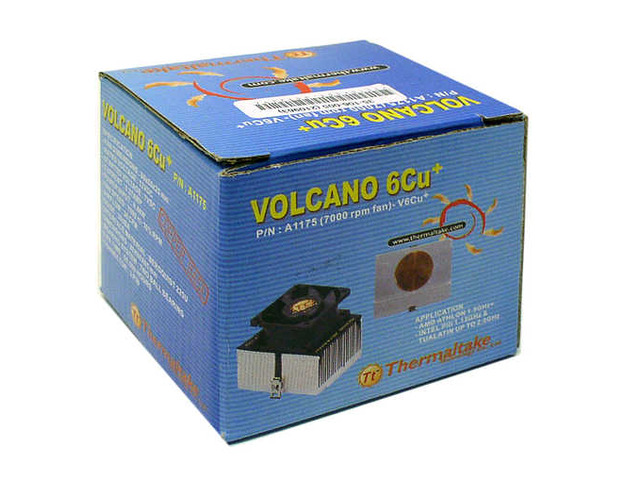
If you have a PIII/Celeron (Socket 370 Type) or an Athlon/AthlonXP up to 1800+ then the Volcano 6Cu+ is a good option:
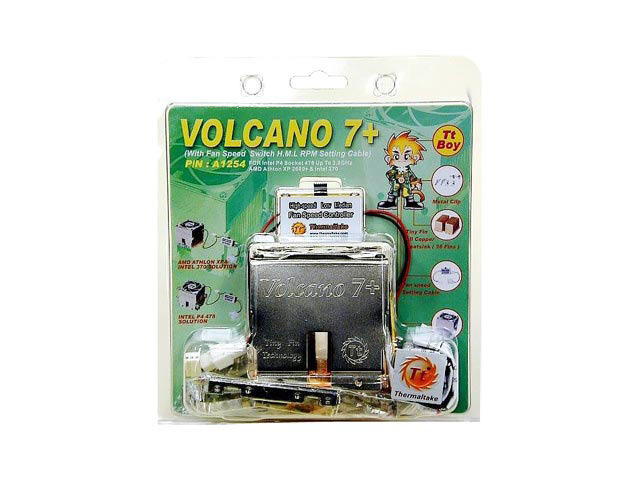
If you have a PIV/Celeron (Socket 487 Type) up to 3.0Ghz or an AthlonXP up to 2600+ then the Volcano 7+ is an option:
If you have an AthlonXP 3400+ or greater, or were thinking of upgrading in the future, then the Silent Boost is an excellent choice:

Take Care,
Richard
Thermaltake has an excellent line of high performance heatsinks. Not knowing the which processor you have, it is hard to make more than a general recommendation. Some ideas:
If you have a PIII/Celeron (Socket 370 Type) or an Athlon/AthlonXP up to 1800+ then the Volcano 6Cu+ is a good option:
If you have a PIV/Celeron (Socket 487 Type) up to 3.0Ghz or an AthlonXP up to 2600+ then the Volcano 7+ is an option:
If you have an AthlonXP 3400+ or greater, or were thinking of upgrading in the future, then the Silent Boost is an excellent choice:
Take Care,
Richard
The Oracle
Joined: Aug 2001
Posts: 2,902
Likes: 0
From: Naples, Florida U.S.A.
allthatglitters,
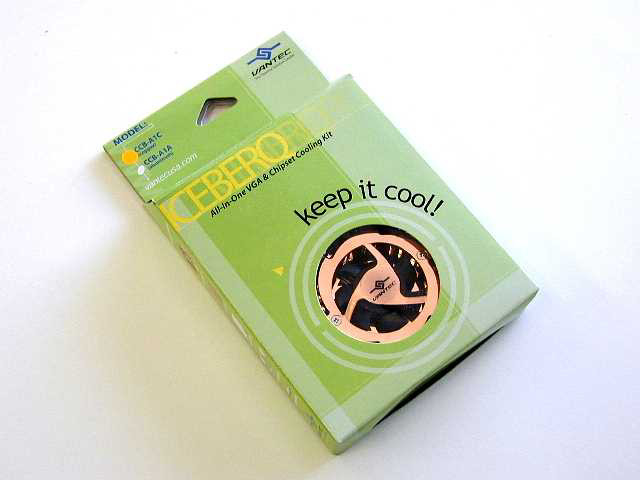
My apologies. I misunderstood. There are aftermarket coolers for the Northbridge too.
Take Care,
Richard
P.S. As long as you are not using onboard Video or seriously overclocking, the Fan on the northbridge is not needed. The heatsink alone is enough to do the job.
My apologies. I misunderstood. There are aftermarket coolers for the Northbridge too.
Take Care,
Richard
P.S. As long as you are not using onboard Video or seriously overclocking, the Fan on the northbridge is not needed. The heatsink alone is enough to do the job.
Thread Starter
Joined: Oct 2001
Posts: 263
Likes: 1
From: farrrr east
I was wondering if the north bridge cooler was actually essential, as have seen many boards without one, and have just reassembled the box after dropping a spot of light lubricating oil on the shaft of the offending item, all’s quite.
Richard, thank you for your help...
Regards All That Glitters
Richard, thank you for your help...
Regards All That Glitters
Thread Starter
Joined: Oct 2001
Posts: 263
Likes: 1
From: farrrr east
I carried out a search for cooling fans and found this...
http://insight.zdnet.co.uk/hardware/...2135514,00.htm
http://insight.zdnet.co.uk/hardware/...2135514,00.htm
The Oracle
Joined: Aug 2001
Posts: 2,902
Likes: 0
From: Naples, Florida U.S.A.
allthatglitters,
Even WD-40 works fine for fans. I would not worry about the article. Usually dust buildup in the computer will make its way to the fan shaft and start scratching the inside walls of the shaft housing. It takes very little time for the shaft house to get wallowed out. (It is made of plastic.) At that point all you can do is replace the fan. I have known people that have used WD-40 as a cheap fix and have not had problems. Just do not squirt it out of an arisol can. Use a rag to apply it. (You do not want excess dripping on your hardware.)
With the Northbridge, the fan is not critical. If your computer starts locking up, you could always get a larger heatsink and fit it to the Northbridge for some silent cooling. (The only time a fan is really needed on a motherboard's northbridge is if the motherboard uses onboard Video or is being seriously overclocked.)
Take Care,
Richard
Even WD-40 works fine for fans. I would not worry about the article. Usually dust buildup in the computer will make its way to the fan shaft and start scratching the inside walls of the shaft housing. It takes very little time for the shaft house to get wallowed out. (It is made of plastic.) At that point all you can do is replace the fan. I have known people that have used WD-40 as a cheap fix and have not had problems. Just do not squirt it out of an arisol can. Use a rag to apply it. (You do not want excess dripping on your hardware.)
With the Northbridge, the fan is not critical. If your computer starts locking up, you could always get a larger heatsink and fit it to the Northbridge for some silent cooling. (The only time a fan is really needed on a motherboard's northbridge is if the motherboard uses onboard Video or is being seriously overclocked.)
Take Care,
Richard


