
I'm still having a Dickens of a job with Photobucket. The Auto copy thing just doesn't. This is using the other method.
This shot is of a target on the second physical drive. HD partition 2 ( as opposed to SSD)
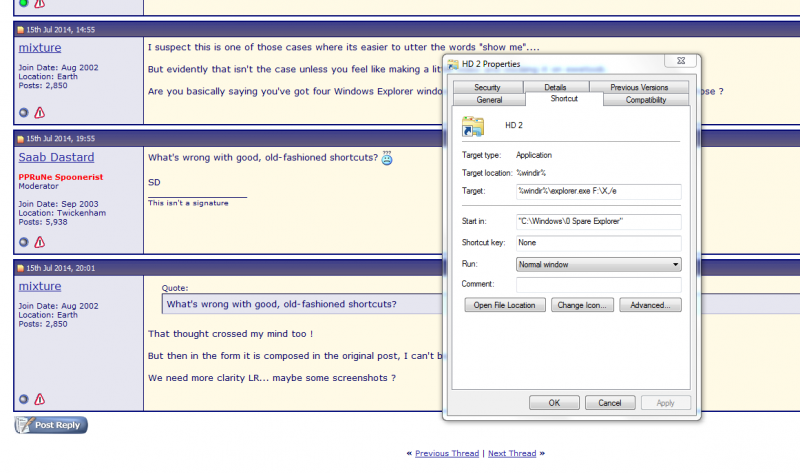
I've used this for years and it seems to be fine except for the amount of Task bar that it takes up. That would be an issue for power users.

The other thing I do is to create a folder called X. As you can see, I aim at that for each drive where I just want to see the whole drive and that way I see my entire tree right away. As mentioned, specific aiming points can be tailored for regular cases. My example of 'Working' gets hit many hundreds if not thousands of times. I pick the file to start Word which then goes right to that file.
This idea is working well apart from the reluctance of just one of the Folder images on the Taskbar to be named correctly. The others look like the picture in the box. What I can't do of course is show the pop up label while snipping. But suffice it to say, they all look like the picture in the properties box -except one which retains the label Windows Explorer Despite showing HD 1 in the box.
I've used this for years and it seems to be fine except for the amount of Task bar that it takes up. That would be an issue for power users.
Oh, I have nothing but a nice picture (or will have) on my desktop. Puts one's mind into creative mode.